
Audi Q3: Overview - Sunroof
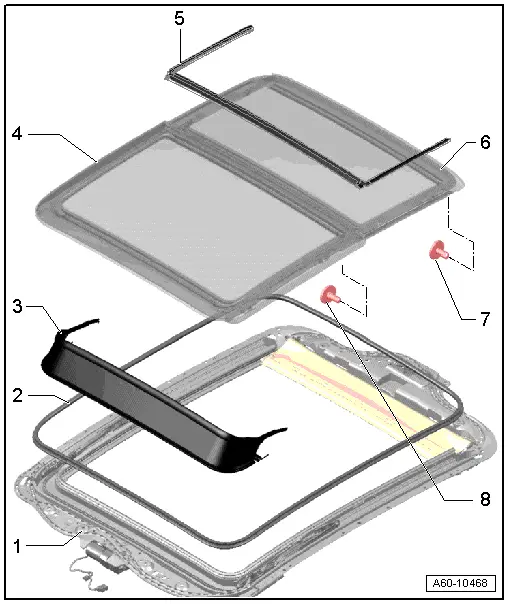
1 - Panorama Roof Frame
- Removing. Refer to → Chapter "Sunroof Frame, Removing and Installing".
2 - Seal
- Open the panel "1" completely and remove the seal.
- When installing, first position is on the front side, then push it to the rear under the panel "2" and press it all the way around onto the flange.
3 - Wind Deflector
- Removing. Refer to → Chapter "Wind Deflector, Removing and Installing".
4 - Panel "1"
- Removing. Refer to → Chapter "Panel 1 for the Panorama Roof, Removing".
5 - Panel Seal
- Removing. Refer to -item 3-.
6 - Panel "2"
- Removing. Refer to → Chapter "Panel 2 for the Panorama Roof, Removing".
7 - Bolt
- 3 Nm
8 - Bolt
- 7 Nm
Overview - Sunroof Shade
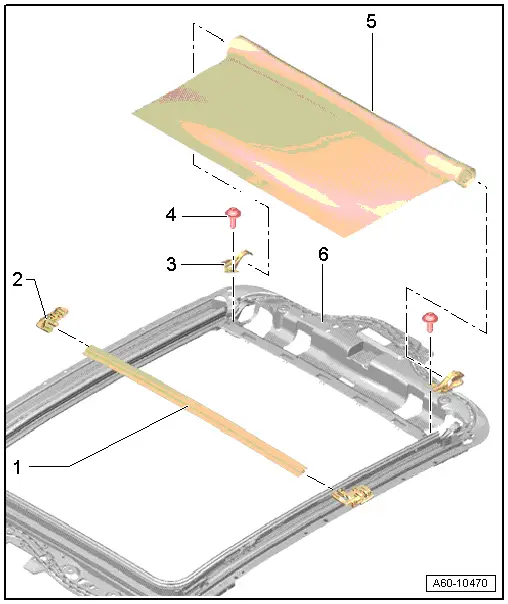
1 - Bow
2 - Sunroof Shade Cable Coupling Plate
- Can only be replaced with the cable.
- Removing, refer to → Chapter "Sunroof Shade Cable, Replacing"
3 - Cable Cover
4 - Bolt
- 1 Nm
5 - Sunroof Shade
- Removing, refer to
→ Chapter "Sunroof Shade, Removing and Installing"
- Remove the side rail from the material for the sunroof shade.
6 - Panorama Sunroof Frame
READ NEXT:
 Sunroof Frame, Removing and Installing
1 - Bolt
3 Nm
2 - Power Sunroof Control Module -J245-.
Performing the adaptation procedure. Refer to
→ Chapter "Motor Adaptation".
3 - Bolt
Glass Panel, Removing and Installing
Panel 1 for the Panorama Roof, Removing
Caution
Do not move or operate the already removed panel
otherwise it may become damaged.
Note
If the screws for the panel mounting wer
Sunroof Seals, Removing and Installing
Installing the Panel Seal
Note
Spray the seal with soapy solution to make the installation
easier.
- Align the seal in the center to the panel and push it into
the both front guidSEE MORE:
Inner Window Shaft Strip, Removing and Installing
Removing
- Remove the front window frame trim panel. Refer to
→ Body Interior; Rep. Gr.70; Front Door Trim; Window Frame Trim
Removing and Installing.
- Remove the window shaft strip -1-
upward -arrows-.
Installing
Install in reverse order of removal. Note the f
Airbag Fasteners, Checking After a Collision
All damaged securing pieces must be replaced, you cannot
reshape components or "make them fit".
The following components must be checked after every airbag
deployment.
With a passenger airbag deployment:
Instrument panel central tube, passenger airbag supports and
passenger airbag must b
© 2019-2026 Copyright www.auq3.net | 0.0119
