
Audi Q3: Speaker Ambient Lighting Bulb 1 and 2 -L211-/-L212-, Removing and Installing
Speaker Ambient Lighting Bulb 1 -L211-, Removing and Installing, Front Door
Removing
- Remove the front door trim panel. Refer to → Body Interior; Rep. Gr.70; Front Door Trim Panels; Front Door Trim Panel, Removing and Installing.
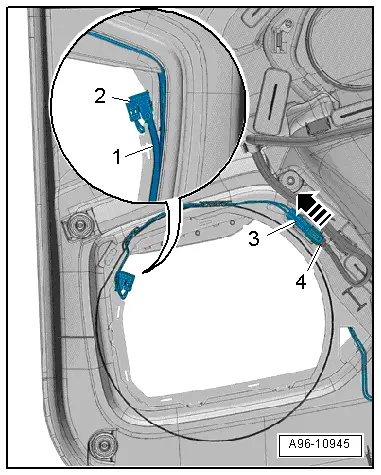
- Disconnect the connector -4-.
- Push the connector -3- to release in the direction of -arrow- and free up the wiring harness.
- Remove the lamp -2- from the lighting strip -1-.
Installing
Install in reverse order of removal. Note the following:
- Install the front door trim panel. Refer to → Body Interior; Rep. Gr.70; Front Door Trim Panels; Front Door Trim Panel, Removing and Installing.
Speaker Ambient Lighting Bulb 2 -L212-, Removing and Installing, Front Door
Removing
- Remove the front door trim panel. Refer to → Body Interior; Rep. Gr.70; Front Door Trim Panels; Front Door Trim Panel, Removing and Installing.
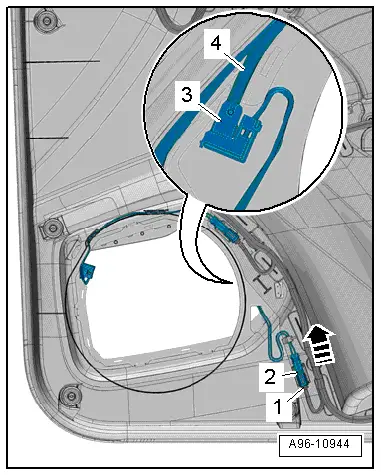
- Disconnect the connector -1-.
- Push the connector -2- to release in the direction of -arrow- and free up the wiring harness.
- Remove the lamp -3- from the lighting strip -4-.
Installing
Install in reverse order of removal. Note the following:
- Install the front door trim panel. Refer to → Body Interior; Rep. Gr.70; Front Door Trim Panels; Front Door Trim Panel, Removing and Installing.
Speaker Ambient Lighting Bulb 1 -L211-, Removing and Installing, Rear Door
Removing
- Remove the rear door trim panel. Refer to → Body Interior; Rep. Gr.70; Rear Door Trim Panels; Rear Door Trim Panel, Removing and Installing.
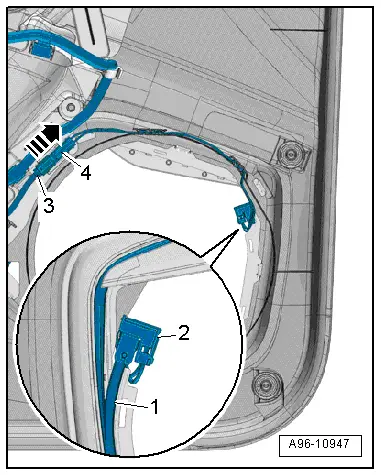
- Disconnect the connector -3-.
- Push the connector -4- to release in the direction of -arrow- and free up the wiring harness.
- Remove the lamp -2- from the lighting strip -1-.
Installing
Install in reverse order of removal. Note the following:
- Install the rear door trim panel. Refer to → Body Interior; Rep. Gr.70; Rear Door Trim Panels; Rear Door Trim Panel, Removing and Installing.
Speaker Ambient Lighting Bulb 2 -L212-, Removing and Installing, Rear Door
Removing
- Remove the rear door trim panel. Refer to → Body Interior; Rep. Gr.70; Rear Door Trim Panels; Rear Door Trim Panel, Removing and Installing.
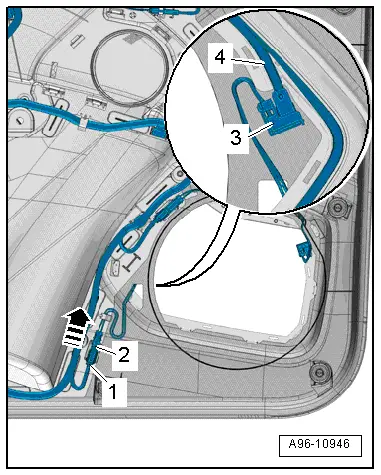
- Disconnect the connector -1-.
- Push the connector -2- to release in the direction of -arrow- and free up the wiring harness.
- Remove the lamp -3- from the lighting strip -4-.
Installing
Install in reverse order of removal. Note the following:
- Install the rear door trim panel. Refer to → Body Interior; Rep. Gr.70; Rear Door Trim Panels; Rear Door Trim Panel, Removing and Installing.
READ NEXT:
 Left and Right Ambient Lighting Bulb for Rear Doors -L166-/-L167-, Removing
and Installing
Left and Right Ambient Lighting Bulb for Rear Doors -L166-/-L167-, Removing
and Installing
Removing
- Remove the switch mount. Refer to
→ Body Interior; Rep. Gr.70; Rear Door Trim Panels; Rear Pull
Handle Removing and Installing.
Note
The entire lamp mu
Component Location Overview - Instrument Panel Controls
1 - ASR/ESP Button -E256-
Removing and installing. Refer to
→ Chapter "ASR/ESP Button -E256-, Removing and Installing".
2 - Left Lower Button Unit
Equipment l
Component Location Overview - Center Console Controls
1 - Access/Start Authorization Button -E408-
Removing and installing. Refer to
→ Chapter "Access/Start Authorization Button -E408-, Removing and
Installing".
2 -&nbsSEE MORE:
Engine oil temperature indicator
Applies to: vehicles with engine oil temperature indicator
Depending on the vehicle equipment, the engine
oil temperature may be indicated by
a bar in
the instrument cluster.
Open the vehicle functions tab.
When engine oil temperatures are low, the display
--- ºF (--- ºC) appears in the instr
Steering wheel
General information
Make sure that:
The distance between your upper body and the
steering wheel is at least 10 inches (25 cm).
Your arms are bent slightly at the elbows.
You have a sufficient view of the area around
the vehicle and you have a clear view of the instrument
cluster
You are alwa