
Audi Q3: Parallel Parking Assist
Overview - Parallel Parking Assist
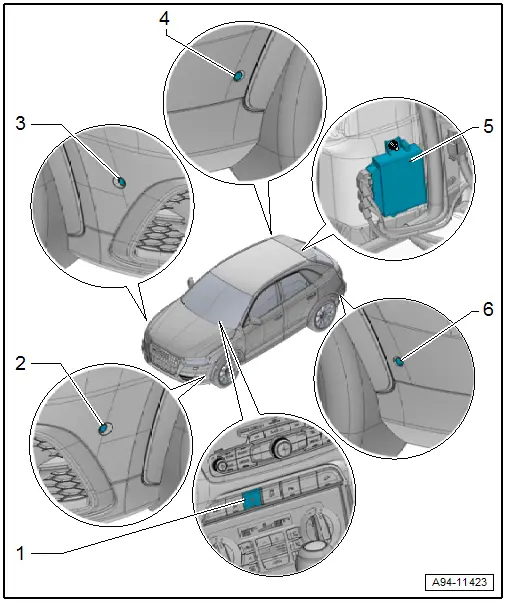
1 - Parallel Parking Assistance Button -E581-
- Overview. Refer to → Chapter "Component Location Overview - Instrument Panel Controls".
2 - Left Front Parallel Parking Assistance Sensor -G568-
- Only on vehicles with parallel parking assistance
- Removing and installing. Refer to → Chapter "Front Sensor, Removing and Installing".
3 - Right Front Parallel Parking Assistance Sensor -G569-
- Only on vehicles with parallel parking assistance
- Removing and installing. Refer to → Chapter "Front Sensor, Removing and Installing".
4 - Right Rear Parallel Parking Assistance Sensor -G717-
- Removing and installing. Refer to → Chapter "Rear Sensor, Removing and Installing".
5 - Parallel Parking Assistance Control Module -J791-
- Removing and installing. Refer to → Chapter "Parking Aid Control Module -J446-, Removing and Installing".
6 - Left Rear Parallel Parking Assistance Sensor -G716-
- Removing and installing. Refer to → Chapter "Rear Sensor, Removing and Installing".
Front Sensor, Removing and Installing
Removing
- Remove the front wheel spoiler. Refer to → Body Exterior; Rep. Gr.66; Wheel Housing Liner; Front Wheel Housing Liner, Removing and Installing.
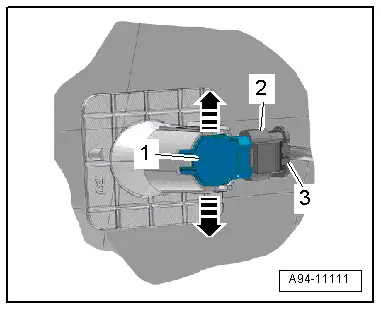
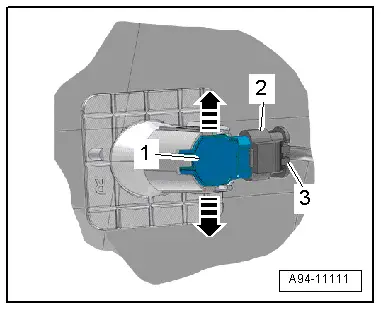
- Press both tabs -arrows- to the side and press the sensor -1- inward from the outside.
- Disconnect the connector -2- by sliding the retainer -3- back and pressing the release down.
Installing
Install in reverse order of removal.
Tightening Specifications
- Wheel spoiler.
Rear Sensor, Removing and Installing
Removing
- Press both tabs -arrows- to the side and press the sensor -1- inward from the outside.
- Disconnect the connector -2- by sliding the retainer -3- back and pressing the release down.
Installing
Install in reverse order of removal.
READ NEXT:
 Automatic Headlamp Range Control
Overview - Automatic Head Lamp Range Control
1 - Left Front Level Control System Sensor -G78-
Component location: on the left front control arm
Removing and installing. Refer to
â
Component Location Overview - Instrument Panel Lamps
1 - Center Instrument Panel Vent Illumination Bulb -L68-
integrated in the center instrument panel vent Cannot be replaced
separately if faulty.
Center Instrument Panel Vent, removSEE MORE:
Immobilizer
General Information
The anti-theft immobilizer system control module can
depending on the vehicle be integrated in the following systems:
Instrument Cluster Control Module -J285-
Comfort System Central Control Module -J393-
Access/Start Authorization Control Module -J518-
Additionally
Vehicle Electrical System, General Repair Information
Caution
When disconnecting and connecting battery, the
procedure must be followed as described in the Repair
Manual.
WARNING
Some tools are supplied with a tool safety clip,
which is slid over the tool points after using the tool,
in order to protect other workers from