
Audi Q3: Overview - Rear Bumper Cover
Overview - Bumper Cover, Audi Q3
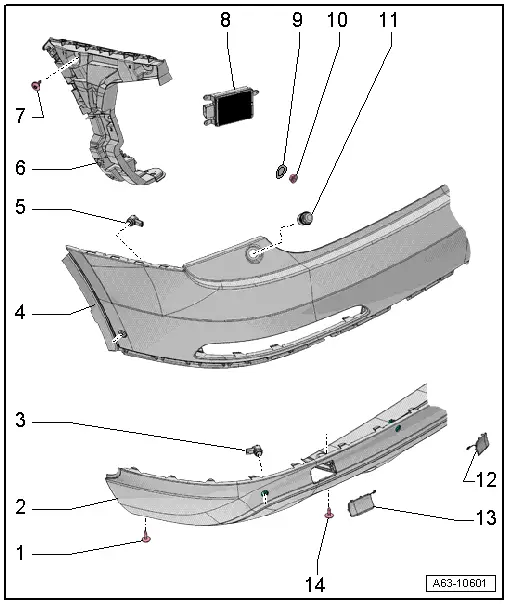
1 - Bolt
- 1.7 Nm
- Quantity: 2
2 - Bumper Cover Lower Section
- There are different versions. Refer to the Parts Catalog.
- Removing and installing. Refer to → Chapter "Bumper Cover Lower Section, Removing and Installing".
3 - Rear Parking Aid Sensor
- Removing and installing. Refer to → Electrical Equipment; Rep. Gr.94; Overview - Parking Aid.
4 - Rear Bumper Cover
- Removing and installing. Refer to → Chapter "Bumper Cover, Removing and Installing".
5 - Rear Parking Aid Sensor
- Removing and installing. Refer to → Electrical Equipment; Rep. Gr.94; Overview - Parallel Parking Assist.
6 - Side Mount
- For the bumper cover
- Removing and installing. Refer to → Chapter "Bumper Cover Side Mount, Removing and Installing".
7 - Bolt
- Quantity: 3
- Tightening sequence → Fig. "Bumper Cover Side Mount - Tightening Specification and Sequence"
8 - Lane Change Assistance Control Module
- Removing and installing. Refer to → Electrical Equipment; Rep. Gr.94; Overview - Parallel Parking Assist.
9 - Grommet
- Quantity: 2
10 - Nut
- Quantity: 4
- 4 Nm
11 - Bolt
- Quantity: 2
- 1.5 Nm
12 - Cover
- For the towing eye
13 - Cover
14 - Bolt
- 6 Nm
- Quantity: 2
Overview - Bumper Cover, Audi Q3 Offroad
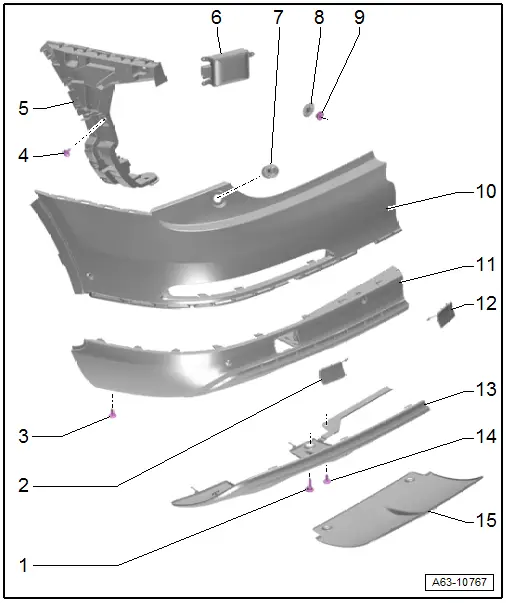
1 - Bolt
- 6 Nm
- Quantity: 2
2 - Cover
3 - Bolt
- 1.7 Nm
- Quantity: 2
4 - Bolt
- Quantity: 3
- Tightening sequence. Refer to → Fig. "Bumper Cover Side Mount - Tightening Specification and Sequence"
5 - Side Mount
- For the bumper cover
- Removing and installing. Refer to → Chapter "Bumper Cover Side Mount, Removing and Installing".
6 - Lane Change Assistance Control Module
- Removing and installing. Refer to → Electrical Equipment; Rep. Gr.94; Overview - Parallel Parking Assist.
7 - Bolt
- 1.5 Nm
- Quantity: 2
8 - Grommet
- Quantity: 2
9 - Nut
- 4 Nm
- Quantity: 4
10 - Rear Bumper Cover
- Removing and installing. Refer to → Chapter "Bumper Cover, Removing and Installing".
11 - Bumper Cover Lower Section
- There are different versions. Refer to the Parts Catalog.
- Removing and installing. Refer to → Chapter "Bumper Cover Lower Section, Removing and Installing".
12 - Cover
- For the towing eye
13 - Impact Guard
- Removing and installing. Refer to → Chapter "Impact Guard, Removing and Installing, Audi Q3 Offroad".
14 - Bolt
- 6 Nm
- Quantity: 2
15 - Cover
- For vehicles with a trailer hitch
Overview - Bumper Cover, Audi RS Q3
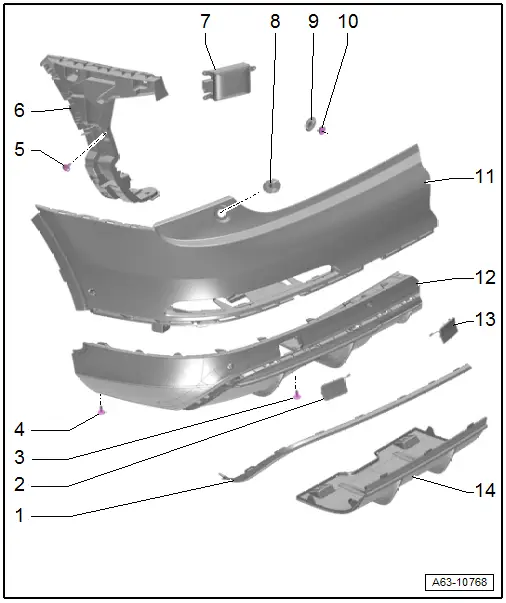
1 - Trim Strip
- For the bumper cover lower section
- Removing and installing. Refer to → Chapter "Bumper Cover Lower Section Trim Strip, Removing and Installing, Audi RS Q3".
2 - Cover
3 - Bolt
- 6 Nm
- Quantity: 2
4 - Bolt
- Quantity: 2
- 1.7 Nm
5 - Bolt
- Quantity: 3
- Tightening sequence, refer to → Fig. "Bumper Cover Side Mount - Tightening Specification and Sequence"
6 - Side Mount
- For the bumper cover
- Removing and installing. Refer to → Chapter "Bumper Cover Side Mount, Removing and Installing".
7 - Lane Change Assistance Control Module
- Removing and installing. Refer to → Electrical Equipment; Rep. Gr.94; Overview - Parallel Parking Assist.
8 - Bolt
- 1.5 Nm
- Quantity: 2
9 - Grommet
- Quantity: 2
10 - Nut
- 4 Nm
- Quantity: 4
11 - Rear Bumper Cover
- Removing and installing. Refer to → Chapter "Bumper Cover, Removing and Installing".
12 - Bumper Cover Lower Section
- There are different versions. Refer to the Parts Catalog.
- Removing and installing. Refer to → Chapter "Bumper Cover Lower Section, Removing and Installing".
13 - Cover
- For the towing eye
14 - Cover
- For vehicles with a trailer hitch
Overview - Impact Member
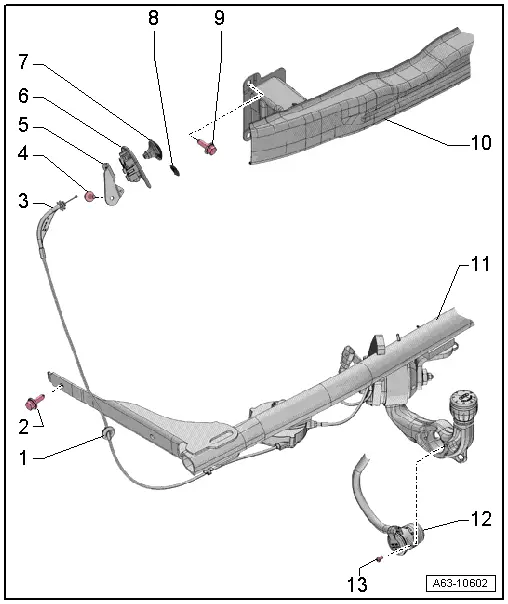
1 - Grommet
- For the cable
2 - Bolt
- 75 Nm
- Quantity: 2
3 - Cable
- For unlocking the trailer hitch
- Refer to → Chapter "Cable and Trailer Hitch Microswitch, Replacing"
4 - Bolt
- 2 Nm
5 - Bracket
- For cable mount
- Overview. Refer to → Chapter "Overview - Trailer Hitch".
6 - Mount
- For the cable
- Overview. Refer to → Chapter "Overview - Trailer Hitch".
7 - Pull Knob
- For unlocking the trailer hitch
- Overview. Refer to → Chapter "Overview - Trailer Hitch".
8 - Lock Clamp
- For the pull knob
9 - Bolt
- 30 Nm
- Left: 2 washers, right: 4 washers
10 - Impact Member
- For vehicles without a trailer hitch
- Removing and installing. Refer to → Chapter "Impact Member, Removing and Installing, Vehicles without Trailer Hitch".
11 - Impact Member
- For vehicles with a trailer hitch
- Removing and installing. Refer to → Chapter "Impact Member, Removing and Installing, Vehicles with Trailer Hitch".
12 - Socket
- Removing and installing. Refer to → Electrical Equipment General Information; Rep. Gr.96; Trailer Hitch.
- Connector assignment. Refer to → Electrical Equipment General Information; Rep. Gr.96; Trailer Hitch.
13 - Bolt
- Quantity: 3
- Tightening specification. Refer to → Chapter "Overview - Trailer Hitch".
READ NEXT:
 Rear Bumper Cover, Removing and Installing
Caution
If the vehicle has lane change assistance, the lane
change assistance control module -J769-/-J770- must be
recalibrated. Refer to
→ Electrical Equipment; Rep. Gr.9
Attachments, Removing and Installing
Bumper Cover Side Mount, Removing and Installing
Removing
- Remove the rear bumper cover. Refer to
→ Chapter "Bumper Cover, Removing and Installing".
- Remove the bolts -arrows-.SEE MORE:
General, Technical data
Repair Information
Wire Routing and Securing
When loosening or removing and installing hydraulic, pneumatic or electrical
lines, draw sketches or take pictures. This will ensure they are installed in
their original positions.
Contact Corrosion
Contact corrosion can occur if incorrect fastene
Refrigerant Circuit
Refrigerant Circuit with Expansion Valve and Evaporator
The following illustration shows only the principle of a
refrigerant circuit, the design of the refrigerant circuit in
the respective vehicle can be found in the vehicle-specific
repair manual. Refer to
→ Heating, Ventilation an