
Audi Q3: Using the telephone
Accessing the telephone functions
Applies to: vehicles with telephone
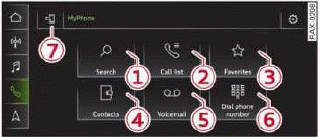
Fig. 124 Center display: selection menu
Requirement: a mobile device must be connected to the MMI.
- Applies to: MMI: Select on the home screen: PHONE.
Possible telephone functions:
- Search
- Call list
- Favorites
- Contacts
- Voicemail
- Dial phone number
- Switch telephones
Managing call lists
Applies to: vehicles with telephone
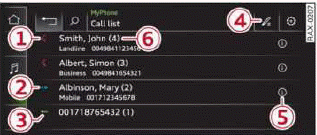
Fig. 125 Center display: call list
Opening call lists using the MMI
- Applies to: MMI: Select on the home screen: PHONE > Call list.
Opening call lists using the multifunction steering wheel
- Select in the instrument cluster: Telephone tab
>
.png) button > Call list.
button > Call list.
Possible call list symbols:
- Missed calls
- Dialed numbers
- Accepted calls
- Editing a telephone number
- Display business card
- Number of interactions with a contact
If more than one interaction with a contact or number has taken place, the last one is displayed in the form of an arrow 1, 2, 3.
Call list options
Press and hold a contact or a phone number in the list until the Options menu appears.
Depending on the vehicle equipment and your mobile phone, the following options may be available:
- Store as favorite
- Send text message
- Send e-mail
Edit number
Edit a phone number before dialing it.
Show history
Requirement: you must have had more than one interaction with a contact.
All interactions with a contact or a number are displayed.
READ NEXT:
 Managing favorites
Applies to: vehicles with telephone
You can store contacts for all connected mobile
devices as shortcuts in the favorites list.
Selecting favorites using the MMI
Applies to: MMI: Select on the home
Opening business cards
Applies to: vehicles with telephone
The business card shows you details about a contact.
To open a business card, press on a contact in
the directory, or
Press in the call list 5
fig. 125.
Po
During a phone call
Applies to: vehicles with telephone
Depending on your mobile device and the type of
connection, the following options may be available during a call:
End call
Mute
Sending a tone sequence
Press NuSEE MORE:
Front Seat, Removing and Installing
Front Seat, Removing and Installing, Manual/Power
Special tools and workshop equipment
required
Universal Vehicle Protector -VAS871 001-
Airbag Lockout Adapter -VAS6282-
Removing
WARNING
Follow all safety precautions when working with
pyrotechnic components. Refer to
â
Overview - Electric Vacuum Pump
1 - Brake System Vacuum Pump -V192-
Allocation, refer to the Parts Catalog.
Installed location: in the engine compartment over the engine
transmission separating point.
Do not disassemble
Removing and installing, refer to
→ Chapter "Electric Vacuum Pump, Removing and