
Audi Q3: Summary
Cockpit
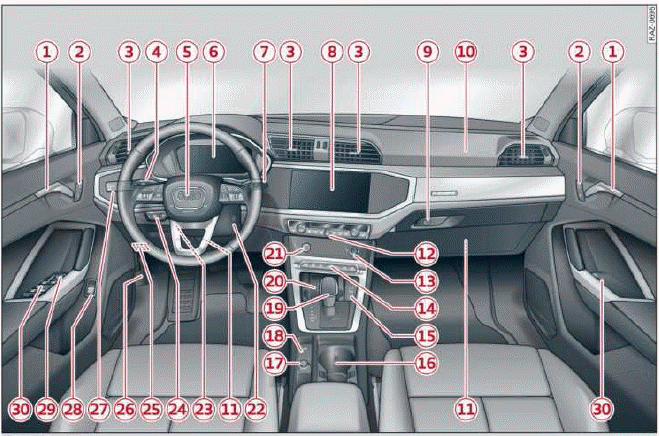
Fig. 1 Cockpit
- Door handle
- Central locking switch
- Air vent with thumbwheel
- Lever for:
- Turn signals and high beams
- High beam assistant
- Lane departure warning
- Lane guidance
- Multifunction steering wheel with:
- Horn

- Driver's airbag
- Operating buttons
- Shift paddles
- Horn
- Instrument cluster
- Windshield washer system lever
- Center display
- Lockable glove compartment
- Front passenger's airbag
- Knee airbag
- Climate control system
- MMI On/Off button
- Depending on equipment, buttons
for:
- drive select
- Electronic Stabilization Control
- Start/Stop system
- Emergency flashers
- Parking system
- Park assist
- Hill hold assist
- USB ports with charging function
- Depending on equipment:
- Cup holder
- Mount for mobile device
- Socket
- Electromechanical parking brake button
- Selector lever (automatic transmission)
- Audi phone box
- START ENGINE STOP button
- Depending on equipment:
- Starting the engine if there is a malfunction
- Ignition lock
- Steering wheel adjustment
- Lever for:
- Cruise control system
- Adaptive cruise assist
- Connection port for the On Board Diagnostic System (OBD)
- Hood release
- Buttons for:
- Lights
- All-weather lights
- Button for:
- Luggage compartment lid
- Exterior mirror adjustment
- Buttons for:
- Power windows
- Child safety lock
Tips
Some of the equipment listed here is only installed in certain models or is available as an option.
Indicator lights overview
Description
The indicator lights in the instrument cluster blink or turn on. They indicate functions or malfunctions.
Some warning and indicator lights turn on when you switch the ignition on and must turn off when the drive system is switched on or while driving With some indicator lights, messages may appear and warning signals may sound. The indicator lights and messages may be covered by other displays. To show them again, select the second tab for messages with the multifunction steering wheel.
Some indicator lights in the display can display in several colors.
Central indicator light
If the  or
or
 indicator light turns on, check the
message in the instrument cluster.
indicator light turns on, check the
message in the instrument cluster.
Overview
The following indicator lights may be available, depending on the vehicle equipment:
Red indicator lights
 Central indicator light,
Instrument cluster
Central indicator light,
Instrument cluster
 Cooling system
 Safety belt
 Transmission
 Drive system
 Brake system, Electromechanical
parking brake
Brake system, Electromechanical
parking brake
 Brake system, Electromechanical
parking brake
Brake system, Electromechanical
parking brake
 Electromechanical parking brake
 Electromechanical parking brake
 Steering
 Steering lock
 Adaptive cruise assist, Safe
start monitor, Driver intervention request
Adaptive cruise assist, Safe
start monitor, Driver intervention request
 Adaptive cruise assist
 Steering intervention request
(Adaptive cruise assist)
Steering intervention request
(Adaptive cruise assist)
 Distance warning
 Lane departure warning
 Pre sense
 Hood
Hood
 Engine oil pressure
 Electrical system
Yellow indicator lights
 Central indicator light
 Engine speed limitation
 Engine speed limitation, Drive
system
Engine speed limitation, Drive
system
 Central locking
 Battery in remote control key
 Bulb failure indicator
 Adaptive light
 Headlight range control system
 Light/rain sensor
 Windshield wipers
 Safety systems
 Engine start system
 Convenience key
 Hill hold assist
 Transmission, Clutch
 Electromechanical parking brake
 Suspension control
 Steering
 Steering lock
 All wheel drive
 Electronic Stabilization Control
(ESC)
Electronic Stabilization Control
(ESC)
 Electronic Stabilization Control
(ESC)
Electronic Stabilization Control
(ESC)
 Electronic Stabilization Control
(ESC)
Electronic Stabilization Control
(ESC)
 Anti-lock Braking System (ABS)
 Anti-lock Braking System (ABS)
 Steering intervention request
(Adaptive cruise assist), Steering intervention request
(Lane departure warning)
Steering intervention request
(Adaptive cruise assist), Steering intervention request
(Lane departure warning)
 Adaptive cruise assist
 Distance warning
 Lane departure warning
 Pre sense
 Side assist
 Emergency assist
 Parking aids
 Rear cross-traffic assist
 Park assist
 Emergency call function
 Tank system
 Malfunction Indicator Lamp (MIL)
 Engine oil level (MIN)
 Engine oil sensor
 Engine warm-up request
 Electrical system
 Washer fluid level
 Tire pressure
 Tire pressure
Other indicator lights
 Low beam headlights
 Parking lights
 Turn signals
 Turn signals
 Start/Stop system
 Hill hold assist
 Trailer turn signals
 Cruise control system
 Cruise control system
 Adaptive cruise assist
 Adaptive cruise assist, Adaptive
cruise assist - ready to
drive
Adaptive cruise assist, Adaptive
cruise assist - ready to
drive
 Adaptive cruise assist
 Adaptive cruise assist
 Adaptive cruise assist
 Efficiency assist
 Efficiency assist
 Efficiency assist
 Efficiency assist
 Efficiency assist
 Efficiency assist
 Efficiency assist
 Lane departure warning
 Lane departure warning
 High beam headlights
.png) High beam assistant
High beam assistant
 Child safety lock
 Child safety lock
 High beam assistant
 Convenience key
 Clutch
 Start/Stop system
 Electromechanical parking brake
 Electromechanical parking brake
 Hill hold assist
 Speed warning system
 Speed warning system
 Camera-based traffic sign
recognition
Camera-based traffic sign
recognition
 Cruise control system
 Cruise control system
 Adaptive cruise assist
 Predictive control, Adaptive
cruise assist
Predictive control, Adaptive
cruise assist
 Adaptive cruise assist
 Distance warning
 Lane departure warning
 Lane departure warning
 Side assist
 Emergency assist
 Parking aids
 Rear cross-traffic assist
 Park assist
 Park assist
READ NEXT:
SEE MORE:
 Folding the outer backrests
Applies to: vehicles with folding backrests
Fig.72 Rear bench seat: loop
The rear seat backrests can be folded forward either
separately or together.
Observe the safety precautions.
If necessary, slide the rear bench seat back.
To fold the backrest forward, pull the strap 1
in the direction of
General information
There may be different media sources and connections
available depending on the vehicle
equipment. For example, you can play media files
using a connected USB drive or connect your mobile
devices to the USB ports with charging function
and operate them through the MMI.
Media and format restrictions