
Audi Q3: Settings
Wi-Fi
Applies to: vehicles with Wi-Fi hotspot
Depending on the country and the vehicle equipment, the following functions may be available:
Wi-Fi
When the function is switched on, the MMI's Wi-Fi hotspot is active and Wi-Fi devices can be connected to the hotspot.
Wi-Fi hotspot settings
The Wi-Fi connection between the MMI and your Wi-Fi device is encrypted. You can change the following information if needed.
- Access point (SSID): name of the Wi-Fi hotspot.
- Password: an initial password was set at the factory in the MMI. Audi recommends changing the initial password. Only use secure passwords that conform to the general guidelines for secure passwords. For more information, refer to reputable and current sources on password security.
Allow data connection through Wi-Fi
When the function is switched on, mobile devices can use the Internet connection through the Wi-Fi hotspot. A data plan is needed to do this.
WARNING
Always follow the information found in General information.
Tips
Always follow the information found in General information.
Note
The name of the Wi-Fi hotspot and the Bluetooth name are automatically compared when there are changes.
Data plans1)
Applies to: vehicles with Audi connect
Data plans must be purchased in order to use certain services in General information.
You can purchase data plans at my.audi.com.
WARNING
Always follow the information found in General information.
Note
Always follow the information found in General information.
Tips
- Depending on the country, you may be able to use an Audi app or my.audi.com.
- Depending on the country, there may be restrictions on the use of data plans (such as mobile phone service providers) when driving in other countries.
- If selling your vehicle, you should delete the vehicle from the customer portal for the cell phone service provider to avoid being charged for additional purchases.
1) Not available in every market.
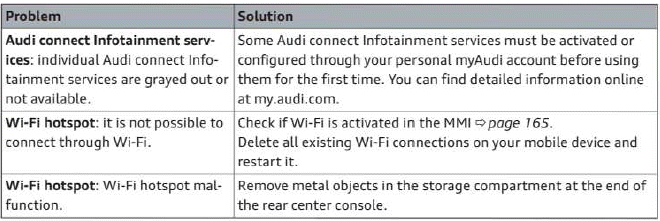
Troubleshooting
Applies to: vehicles with Audi connect Infotainment
The information that follows lists some troubleshooting options. They depend on the equipment.
READ NEXT:
 Emergency call
Overview
Applies to: vehicles with emergency call function
An emergency call is a combination of data transmission
and a phone call. Your vehicle uses data
transmission to forward important informatiSEE MORE:
Roof Trim Panels
Component Location Overview - Roof Trim Panel
1 - Roof Grab Handle
Overview. Refer to
→ Chapter "Overview - Sun Visors".
2 - Sun Visor
Overview. Refer to
→ Chapter "Overview - Sun Visors".
3 - Front Interior Lamp/Reading Lamp
Remov
Ground Cable with Battery Monitoring Control Module -J367-, Removing and
Installing
Ground Cable with Battery Monitoring Control Module -J367-, Removing and
Installing, Engine Compartment Battery Version 1
Removing
- Turn off the ignition.
- Vehicles with ignition lock: Remove the key.
- Push the release button -1- and
pivot the battery cover -2- upwards
at