
Audi Q3: Rear Lid Seal, Removing and Installing
Body Exterior / Body / Audi Q3 (8U) 2011-2018 Service Manual / Rear Lid Seal, Removing and Installing
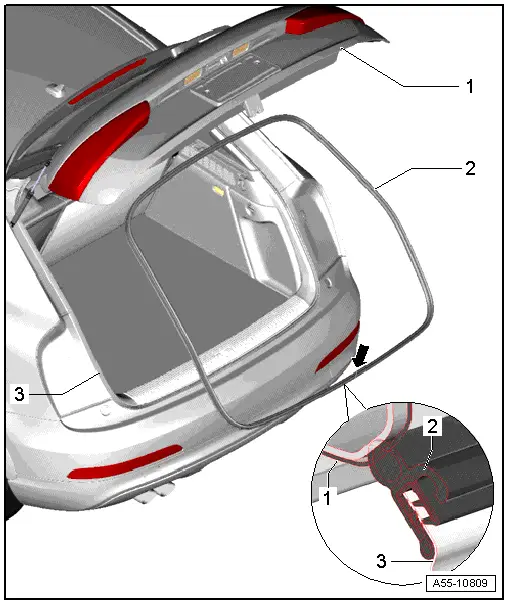
1 - Rear Lid
2 - Rear Lid Seal
- To remove, remove seal from body flange.
- When installing, align the seal with the joint -arrow- with the marking in the center of the vehicle.
- Beginning at the seam, press the seal all around onto the body flange.
3 - Body Flange
Gas-Filled Strut, Removing and Installing
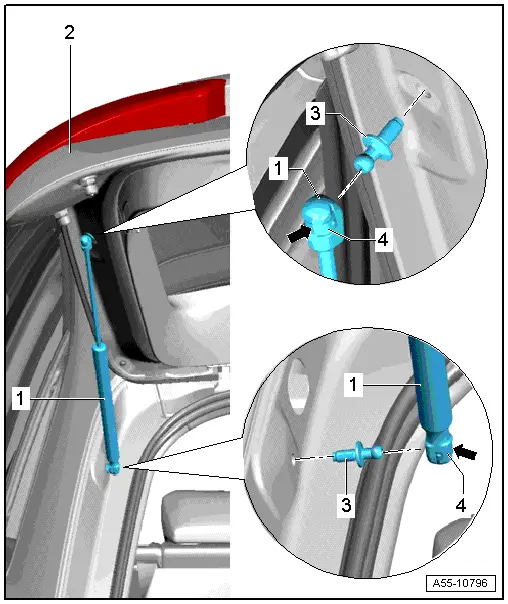
1 - Gas-Filled Strut
 Note
Note
- After completely removing gas-filled strut, ensure correct position when installing.
- Noise insulation element must be engaged in rear lid side.
- Open and support the rear lid when removing.
- Using screwdriver, lift retaining spring -2- as shown and remove gas-filled strut -1- from upper ball head pin -3-.
2 - Rear Lid
3 - Ball Stud
- 21 Nm
 Note
Note
Should the ball head pin have to be removed or adjusted, then replace it.
4 - Locking Spring
- Refer to → Fig. "Unlocking the Locking Spring"To remove the gas-filled strut, slightly lift the retaining spring -arrow- with a small screwdriver.
Installing
Install in reverse order of removal while noting the following:
- To install push the gas-filled struts with a light rotational movement on the ball stud.
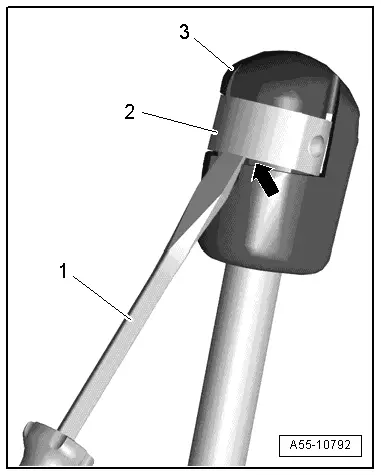
Unlocking the Locking Spring
- Remove retaining spring -2- with small screwdriver -1- and disengage gas-filled strut-3- , that can finally be removed from ball stud.
READ NEXT:
 Fuel Filler Door Unit
Overview - Fuel Filler Door Unit
Overview - Fuel Filler Door Unit
1 - Drain Hose
Make sure the routing is correct. Refer to
→ Chapter "Overview - Fuel Filler Door Unit Drain
Overview - Door
1 - Door
Removing and installing. Refer to
→ Chapter "Door, Removing and Installing".
2 - Bolt
45 Nm
Note
The bolt is a fitting bolt so it is SEE MORE:
Cover and Cushion, Separating
Cover and Cushion, Separating, Bench Seat
Special tools and workshop equipment
required
Upholstery Clip Pliers -VAG1634-
Removing
- Remove the rear bench seat. Refer to
→ Chapter "Bench Seat/Single Seat, Removing and Installing".
- Remove seat cover with seat cushion f
General Information
Note
Because tire damage can have serious consequences, the
technician and the driver should regularly check the tires, as
it is the best form of early problem recognition.
Pre-damaged tires cannot withstand driving situations like
high vehicle speed, long driving distance, sporty d
© 2019-2026 Copyright www.auq3.net | 0.0092
