
Audi Q3: Horn
Overview - Horn
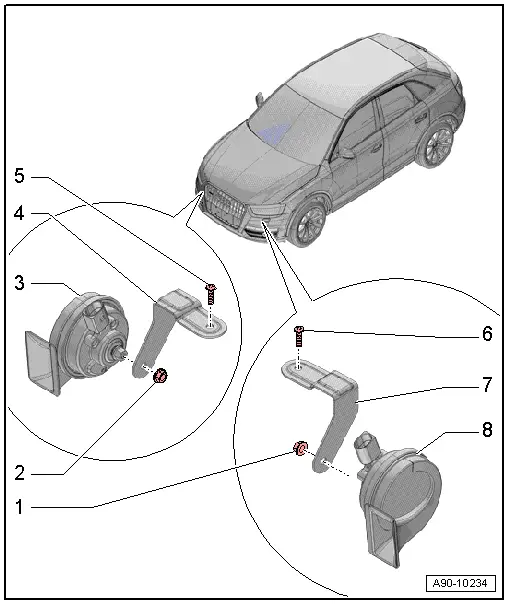
1 - Nut
- 9 Nm
2 - Nut
- 9 Nm
3 - Low Tone Horn -H7-
- Removing and installing. Refer to → Chapter "High Tone Horn -H2-/Low Tone Horn -H7-, Removing and Installing".
4 - Bracket
- For the right horn
5 - Bolt
- 20 Nm
6 - Bolt
- 20 Nm
7 - Bracket
- For the left horn
8 - High Tone Horn -H2-
- Removing and installing. Refer to → Chapter "High Tone Horn -H2-/Low Tone Horn -H7-, Removing and Installing".
High Tone Horn -H2-/Low Tone Horn -H7-, Removing and Installing
High/Low Tone -H2-/-H7-, Removing and Installing, through MY 2014
Special tools and workshop equipment required
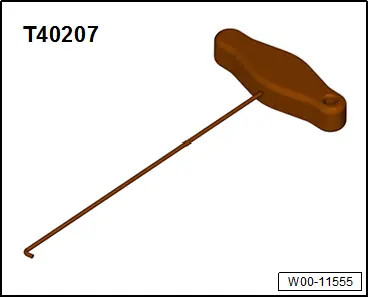
- Hook Tool -T40207-
Removing
- Insert the Hook Tool -T40207- in the opening -1- and remove the lower air intake grille -2- from the bumper cover in direction of -arrow-.
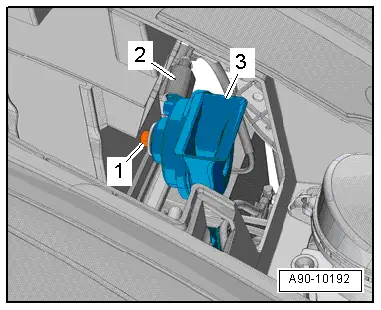
- Remove the nut -1-.
- Remove the horn -3- from the bracket.
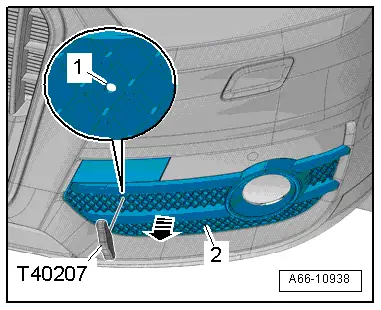
- Disconnect the connector -2-.
Installing
Install in reverse order of removal.
High/Low Tone -H2-/-H7-, Removing and Installing, from MY 2015
Removing
- Remove the wheel spoiler. Refer to → Body Exterior; Rep. Gr.66; Wheel Housing Liner; Front Wheel Housing Liner, Removing and Installing.
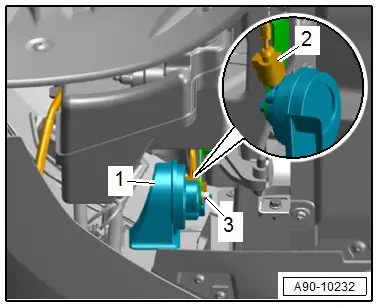
- Remove the nut -3-.
- Remove the horn -1- from the bracket.
- Disconnect the connector -2-.
Installing
Install in reverse order of removal.
Special Tools
Special tools and workshop equipment required
- Hook Tool -T40207-
READ NEXT:
 Windshield Wiper System
Overview - Windshield Wiper System
Overview - Windshield Wiper System
1 - Bolt
Tightening sequence. Refer to → Fig. " Windshield Wiper
Motor -V- - Tightening Specification
Windshield Wiper Arms, Removing and Installing
Special tools and workshop equipment
required
Puller - Wiper Arm Kit -T10369-
Removing
Note
If the windshield wiper motor is to be run during the work
procedure, the hood must beSEE MORE:
Correct safety belt positioning
Fig. 58 Lap/shoulder belt positioning
Fig. 59 Safety belt positioning for pregnant women
Fastened safety belts only offer optimal protection
during an accident and reduce the risk of serious
injury or death when they are positioned
correctly. Furthermore, the correct safety belt
position holds the
Playing media
Media sources
The following sources can be selected depending
on the vehicle equipment:
Alexa
USB device
Connect external device: you can connect external
devices via Bluetooth and use the Bluetooth
audio player or you can connect
an external device directly to the USB
ports with charging 