
Audi Q3: Battery Tray, Removing and Installing
Battery Tray, Removing and Installing, Version 1
Removing
- Remove the air filter housing. Refer to → Rep. Gr.23; Air Filter; Air Filter Housing, Removing and Installing or → Rep. Gr.24; Air Filter; Air Filter Housing, Removing and Installing.
- Remove the battery. Refer to → Chapter "Battery in Engine Compartment, Removing and Installing, Version 1".
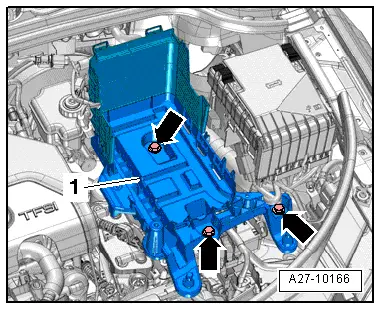
- Free up the wire from the battery tray.
- Remove the bolts -arrows-.
- Remove the battery tray -1-.
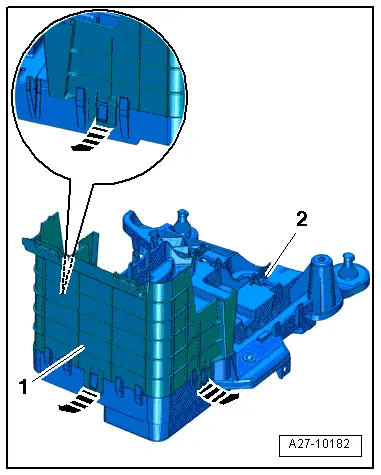
- Release the clips in direction of -arrows- and remove the rear battery jacket -1- on the battery tray -2-.
Installing
Install in reverse order of removal. Note the following:
- Install the battery. Refer to → Chapter "Battery in Engine Compartment, Removing and Installing, Version 1".
- Install the air filter housing. Refer to → Rep. Gr.23; Air Filter; Overview - Air Filter Housing or → Rep. Gr.24; Air Filter; Overview - Air Filter Housing.
Battery Tray, Removing and Installing, Version 2
Removing
- Remove the battery. Refer to → Chapter "Battery in Engine Compartment, Removing and Installing, Version 2".
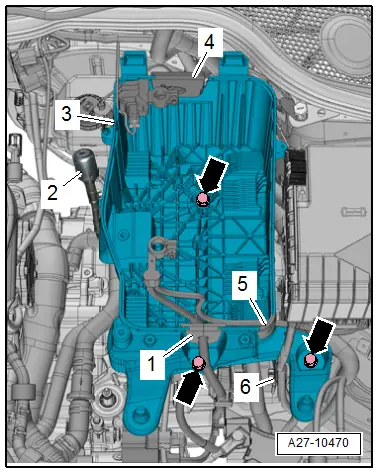
- Free up the grommets -1, 4 and 5- for the wire from the battery tray.
- Free up the wire from the battery tray.
- If equipped, free up the transmission ventilation -2- from the battery tray.
- Remove the bolts -arrows-.
- Remove the battery tray -3-.
Installing
Install in reverse order of removal. Note the following:
- Install the battery. Refer to → Chapter "Battery in Engine Compartment, Removing and Installing, Version 2".
READ NEXT:
 Battery, Charging
Preparing for Charging, Engine Compartment Battery
Procedure
WARNING
Risk of explosion on discharged battery with "Visual
indicator".
If the "Visual indicator" has no color or is light
Battery Jump Start Terminal
Overview - Battery Jump Start Terminal
1 - Bolt
6 Nm
2 - Battery Jump Start Terminal -U6-
With positive terminal grip
Removing and installing. Refer to
→ C
Start/Stop System
Component Location Overview - Start/Stop System
1 - Bracket
For the Voltage Stabilizer -J532-
2 - Connector
3 - Voltage Stabilizer -J532-
Removing and instSEE MORE:
Unlocking and locking the vehicle
Fig. 26 Door handle: sensor for locking the vehicle
Depending on the vehicle equipment, you may
have various options for unlocking and locking
your vehicle. The settings in the MMI specify
which doors will unlock.
Unlocking or locking using the vehicle key
buttons
To unlock the vehicle, press the
Child safety seats
General information
When installing and using child safety seats, follow
the information in this Owner's Manual, the
applicable state and federal regulations, and the
manufacturer instructions for the child safety
seat.
WARNING
To reduce the risk of serious or fatal injuries,
children must always be