
Audi Q3: Battery Jump Start Terminal
Overview - Battery Jump Start Terminal
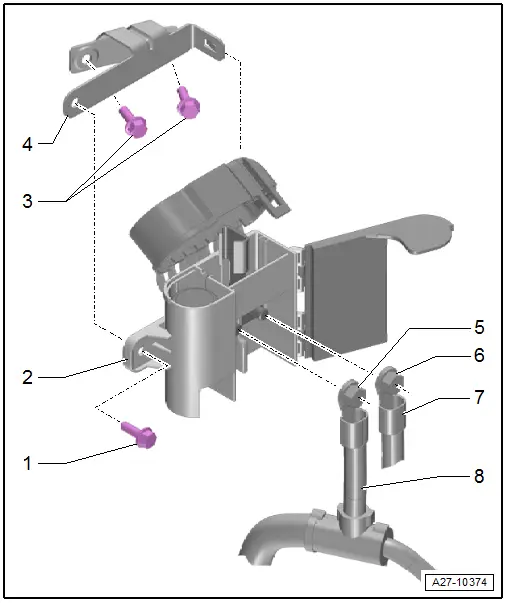
1 - Bolt
- 6 Nm
2 - Battery Jump Start Terminal -U6-
- With positive terminal grip
- Removing and installing. Refer to → Chapter "Jump Start Point, Removing and Installing".
3 - Bolts
- 8 Nm
4 - Mount
- For Battery Jump Start Terminal -U6-
5 - Nut
- 15 Nm
6 - Nut
- 15 Nm
7 - Positive Cable
- E-Box
8 - Positive Cable
- Battery
Jump Start Point, Removing and Installing
Removing
- With the ignition switched off, disconnect the ground cable from the battery. Refer to → Chapter "Battery in Luggage Compartment, Disconnecting and Connecting".
- Remove the air filter housing. Refer to → Rep. Gr.24; Air Filter; Air Filter Housing, Removing and Installing.
- Release the catch -5- and open the cover -4-.
- Unlock the door -3- and swivel it to the side in direction of -arrow-.
- Remove the nut -2- and set aside the wire -1-.
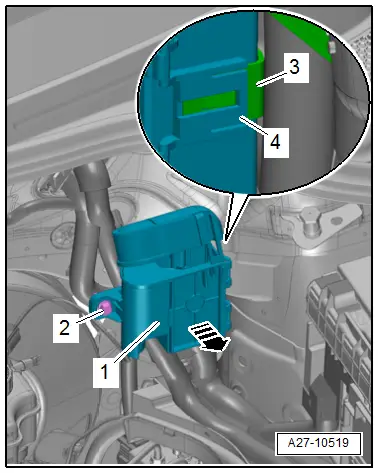
- Remove the bolt -2-.
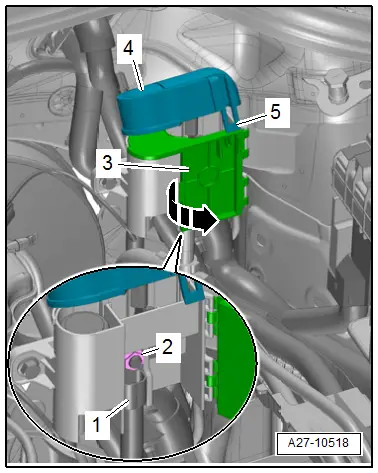
- Release the catch -4- and remove the battery jump start terminal -1- forward from the mount -3--arrow-.
Installing
Install in reverse order of removal.
READ NEXT:
 Start/Stop System
Component Location Overview - Start/Stop System
1 - Bracket
For the Voltage Stabilizer -J532-
2 - Connector
3 - Voltage Stabilizer -J532-
Removing and inst
Instrument Cluster
Overview - Instrument Cluster
1 - Outside Air Temperature Sensor -G17-
Removing and installing. Refer to
→ Chapter "Outside Air Temperature Sensor, Removing and Installing".
SEE MORE:
Sunroof Frame, Removing and Installing
1 - Bolt
3 Nm
2 - Power Sunroof Control Module -J245-.
Performing the adaptation procedure. Refer to
→ Chapter "Motor Adaptation".
3 - Bolt
8 Nm.
4 - Roof
5 - Panorama Roof Frame
Removing
Headliner remo
Instrument Panel Central Tube
Overview - Instrument Panel Central Tube
1 - Bolt
20 Nm
2 - Nut
23 Nm
Quantity: 2
Always replace if removed
3 - Threaded Pin
20 Nm
Quantity: 2
4 - Balancing Element
Clip in on the central tube
Check the balanc