
Audi Q3: Operating the peripheral cameras
Assist systems / Audi Q3 (F3) 2018-2026 Owner's Manual / Operating the peripheral cameras
Applies to: vehicles with peripheral cameras
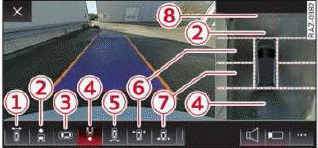
Fig. 117 Center display: peripheral cameras
On vehicles with peripheral cameras, you can select among different views.
Selecting the views
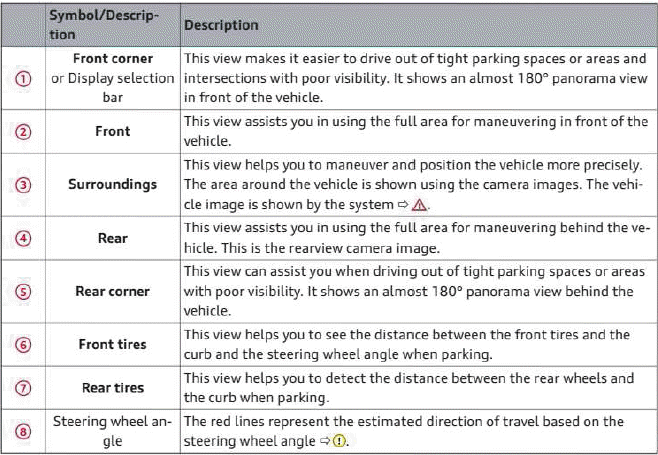
- To display the entire selection bar, tap the current view 1 or swipe at the edge of the selection bar from left to right.
- To select a view, press 1 - 7 or tap in an area to show the vehicle in the side view1).
1) Requirement: The vehicle surroundings (Camera) is selected and visible in the View in the side area.
Selecting a view in the side area
The vehicle surroundings are shown in the side area of the display. You can switch between a visual display (Graphic) and the vehicle surroundings (Camera).
- Select
.png) > View
in the center display when the parking aid is active.
> View
in the center display when the parking aid is active.
WARNING
- Observe the safety precautions and note the limits of the assist systems, sensors, and cameras.
- The Surroundings view is created from the individual camera images. The vehicle image is shown by the system. Objects and obstacles above the camera are not displayed.
Note
Only use the images provided by the camera on the rear of the vehicle when the luggage compartment lid is completely closed. Make sure any objects you may have mounted on the luggage compartment lid do not block the rearview camera.
Tips
- Depending on the selected gear, it will automatically switch between the Front and Rear views. If you switch the view manually, the automatic front/rear camera change will be temporarily deactivated.
- When first activated while a forward gear is engaged, the Front corner is displayed.
READ NEXT:
 Rear cross-traffic assist
Description
Applies to: vehicles with rear cross-traffic assist
Fig. 118 Sensor detection range for rear cross-traffic assist
Fig. 119 Center display: rear cross-traffic assist display
General infor
Assisted parking
General information
Applies to: vehicles with park assist
If your vehicle is equipped with park assist, this
system helps you find suitable parking spaces.
Parking spaces are measured using ultrasoni
Park assist
General information
Applies to: vehicles with park assist
The park assist helps you when parking and exiting
parking spaces after the parking space search. The park assist takes over the
steering of
SEE MORE:
Setup
Connecting a mobile phone via Bluetooth
Applies to: vehicles with telephone
Requirement: the vehicle must be stationary and
the ignition must be switched on. The Bluetooth
settings must be open on your mobile device during
the connection setup. The mobile device to be
connected must not be actively
Door, Removing and Installing
Removing
- Disconnect the door connector on the A-pillar. Refer to
→ Electrical Equipment; Rep. Gr.97; Connectors.
Note
Secure the A-pillar in the area of the door arrester using
adhesive tape, so that the paint will not be damaged.
- Remove the door arrest
© 2019-2026 Copyright www.auq3.net | 0.0118
