
Audi Q3: Midrange Speaker Trim, Removing and Installing
Special tools and workshop equipment required
- Wedge Set -T10383-
Removing
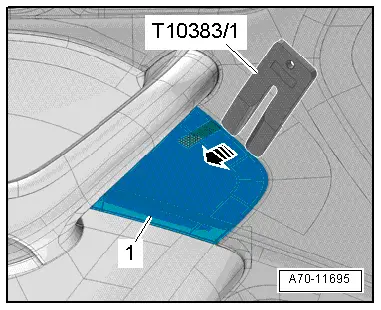
- Pry out the speaker trim -1- along the door trim seam -arrow- using the Wedge -T10383/1- and remove it.
Installing
Install in reverse order of removal.
Installation notes, for example tightening specifications, replacing components. Refer to → Chapter "Overview - Front Door Trim Panel".
Treble Speaker Trim, Removing and Installing
Special tools and workshop equipment required
- Wedge Set -T10383-
Removing
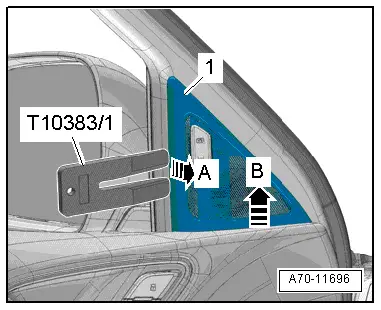
- Pry out the speaker trim -1- along the window frame trim panel seam -arrow- using the Wedge -T10383/1- and remove it.
- Pull the speaker trim from the door trim panel -arrow B- and remove.
Installing
Install in reverse order of removal.
Installation notes, for example tightening specifications, replacing components. Refer to → Chapter "Overview - Front Door Trim Panel".
Bass Speaker Trim, Removing and Installing
Special tools and workshop equipment required
- Wedge Set -T10383-
Removing
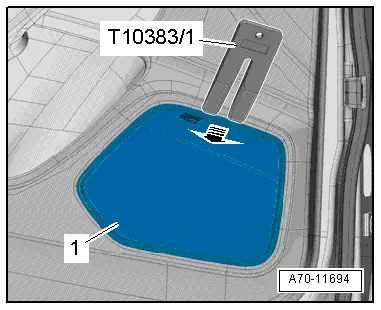
- Pry out the speaker trim -1- along the door trim seam -arrow- using the Wedge -T10383/1- and remove it.
- Versions with a Driver/Front Passenger Door Ambient Lighting Bulb -L164-/-L165-: disconnect the connector.
Installing
Install in reverse order of removal.
Installation notes, for example tightening specifications, replacing components. Refer to → Chapter "Overview - Front Door Trim Panel".
Trim Molding, Removing and Installing
Special tools and workshop equipment required
- Wedge Set -T10383-
Removing
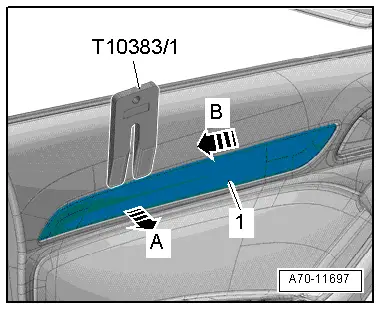
- Carefully pry the trim molding -1- out of the door trim panel along the seam using the Wedge Set -T10383/1--A arrow-.
- Slightly raise the trim molding and slide rearward -arrow B- so that the trim panel hooks on the inside can be released from the cut-out of the door trim.
Installing
Install in reverse order of removal.
Installation notes, for example tightening specifications, replacing components. Refer to → Chapter "Overview - Front Door Trim Panel".
READ NEXT:
 Front Door Trim Panel, Removing and Installing
Special tools and workshop equipment
required
Wedge Set -T10383-
Removing
- Switch the ignition off and remove the ignition key.
- Remove the trim panel. Refer to
→ Chapt
Front Pull Handle, Removing and Installing
Front Pull Handle, Removing and Installing
Removing
- Remove the armrest. Refer to
→ Chapter "Front Armrest, Removing and Installing".
- Disconnect the connector for the window r
Overview - Rear Door Trim Panel
1 - Pull Handle
With switch mount
Removing and installing. Refer to
→ Chapter "Rear Pull Handle, Removing and Installing".
2 - Left Rear Entry Lamp -W33-
RiSEE MORE:
Manual shifting
Fig.82 Center console: shifting manually with the selector lever
Fig. 83 Steering wheel: shift paddles
You can shift the gears manually when in "D"
mode. The transmission must be in tiptronic
mode.
Shifting with the selector lever
You can shift into manual shifting mode while the
vehicle is statio
Component Location Overview - Passenger Compartment Trim
1 - Cover
Overview. Refer to
→ Chapter "Overview - C-Pillar Trim Panel".
2 - Rear Sill Panel Strip
Overview. Refer to
→ Chapter "Overview - Rear Sill Panel Strip".
3 - Lower B-Pillar Trim Panel
Overview. Refer to
→ Chapter 