
Audi Q3: Component Location Overview - Passenger Compartment Trim
Body Interior / Body / Audi Q3 (8U) 2011-2018 Service Manual / Component Location Overview - Passenger Compartment Trim
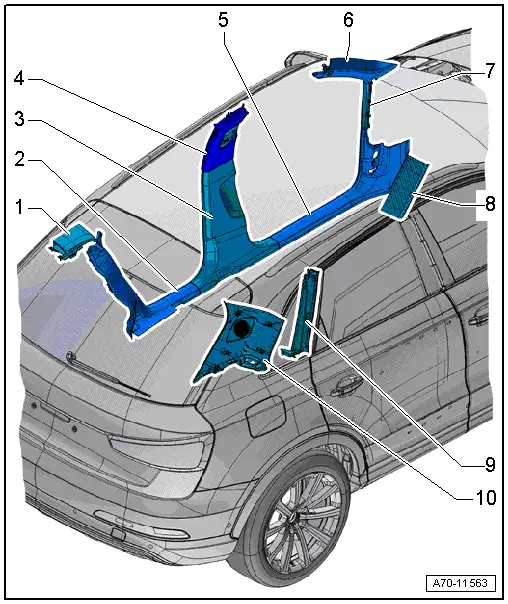
1 - Cover
- Overview. Refer to → Chapter "Overview - C-Pillar Trim Panel".
2 - Rear Sill Panel Strip
- Overview. Refer to → Chapter "Overview - Rear Sill Panel Strip".
3 - Lower B-Pillar Trim Panel
- Overview. Refer to → Chapter "Overview - B-Pillar Trim Panel".
4 - Upper B-Pillar Trim Panel
- Overview. Refer to → Chapter "Overview - B-Pillar Trim Panel".
5 - Front Sill Panel Strip
- Overview. Refer to → Chapter "Overview - Front Sill Panel Strip".
6 - Upper A-Pillar Trim Panel
- Overview. Refer to → Chapter "Overview - A-Pillar Trim Panel".
7 - A-Pillar Gap Cover
- Overview. Refer to → Chapter "Overview - Front Sill Panel Strip".
8 - Footrest/Floor Covering
- Overview. Refer to → Chapter "Overview - Foot Rest and Carpet".
9 - C-Pillar Trim Panel
- Overview. Refer to → Chapter "Overview - C-Pillar Trim Panel".
10 - D-Pillar Trim Panel
- Overview. Refer to → Chapter "Overview - D-Pillar Trim Panel".
Overview - Sill Panel Strip
Overview - Front Sill Panel Strip
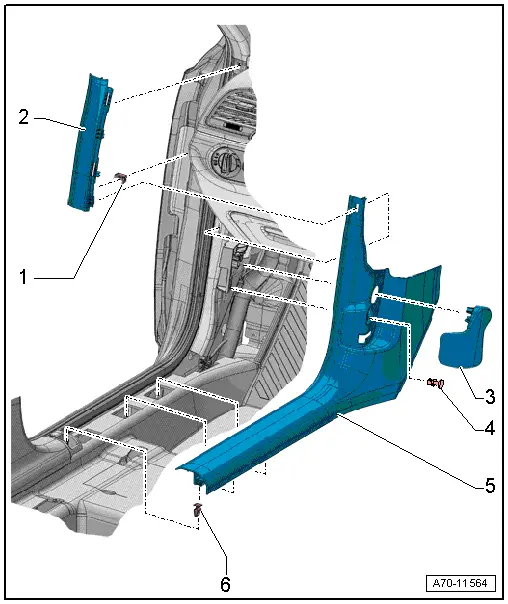
1 - Clip
- Replace any damaged or deformed clips
- install inside the body
- Remove any remaining clips in the body mounting points using the Omega Clip Tool -T40280-. To install, insert into the gap cover.
2 - A-Pillar Gap Cover
- Removing and installing. Refer to → Chapter "Front Sill Panel Strip, Removing and Installing".
- Clip in the upper A-pillar trim and the front sill panel
- Stretch the door seal lip over
3 - Operating Lever
- Hood release cable
- Driver side only
- Removing and installing. Refer to → Body Exterior; Rep. Gr.55; Hood; Hood Release Lever, Removing and Installing.
- Push off the bracket mount and secure with clip.
4 - Expanding Clip
- Driver side only
5 - Front Sill Panel Strip
- Removing and installing. Refer to → Chapter "Front Sill Panel Strip, Removing and Installing".
- Press on until it engages audibly
- Stretch the door seal lip over
6 - Clip
- Quantity: 3
- Insert in the sill panel strip
- Remove the clips left in the mounting points of the body and use for installation in the sill panel strip
- Remove any remaining clips in the body mounting points using the Omega Clip Tool -T40280-. To install, insert into the sill panel strip.
- Replace damaged or deformed clips
Overview - Rear Sill Panel Strip
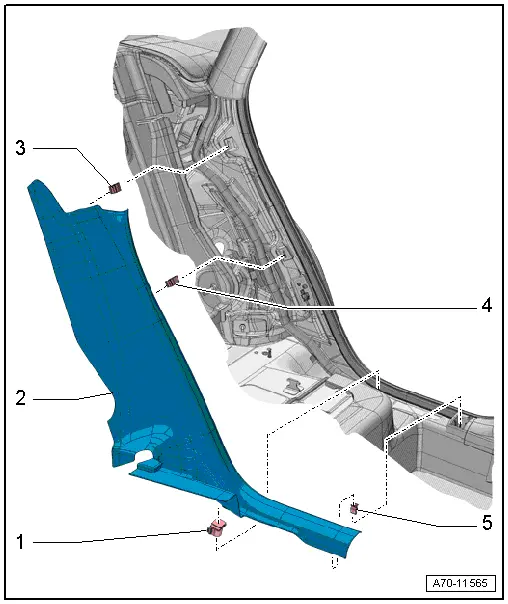
1 - Clip
- Insert in the sill panel strip
2 - Rear Sill Panel Strip
- Removing and installing. Refer to → Chapter "Rear Sill Panel Strip, Removing and Installing".
- Place the sill panel strip in the belt guide and the C-pillar trim.
- Press on until it engages audibly
- Stretch the door seal lip over
3 - Clip
- Insert in the sill panel strip
- Remove any remaining clips in the body mounting points using the Omega Clip Tool -T40280-. To install, insert into the sill panel strip.
- Replace damaged or deformed clips
4 - Clip
- insert in the sill panel strip
- Remove any remaining clips in the body mounting points using the Omega Clip Tool -T40280-. To install, insert into the sill panel strip.
- Replace damaged or deformed clips
5 - Clip
- insert in the sill panel strip
- Remove any remaining clips in the body mounting points using the Omega Clip Tool -T40280-. To install, insert into the sill panel strip.
- Replace damaged or deformed clips
READ NEXT:
 Overview - A-Pillar Trim Panel
1 - Lower Clamp
Without hooks
Replace damaged or deformed clips
Insert in the trim panel
Remove any remaining clips in the body mounting points using the
Omega Clip Tool -T4028
Sill Panel Strip, Removing and Installing
Front Sill Panel Strip, Removing and Installing
Special tools and workshop equipment
required
Trim Removal Wedge -3409-
Omega Clip Tool -T40280-
Removing
- Remove the instrument pane
A-Pillar Trim Panel, Removing and Installing
Special tools and workshop equipment
required
Pry Lever -80-200-
Omega Clip Tool -T40280-
Removing
WARNING
Follow all safety precautions when working with
pyrotechnic componenSEE MORE:
Interior Rearview Mirror, Removing and Installing
Removing
- Turn interior rearview mirror at the mirror base
-1- counterclockwise
-arrow- as far as the stop and
remove from the retaining plate.
Interior Rearview Mirror without Optional Equipment:
WARNING
Follow the safety precautions for the automatic
dimming interior re
Front Brake Caliper Balance Weight
Depending on the model for each brake caliper two vibration
dampers are installed.
1 - Bolt
10 Nm
Replace after each removal.
2 - Vibration Damper
Installed 2 on each brake caliper
Removing and installing, refer to
→ Chapter "Damper, Removing and Inst
© 2019-2026 Copyright www.auq3.net | 0.0104
