
Audi Q3: Left Temperature Door Motor -V158-, Removing and Installing
 Note
Note
- Only on vehicles with an automatic climate control system
- For vehicles with a manual climate control system (or heater without Air Conditioning (A/C) system), the temperature doors are actuated by the Temperature Regulator Door Motor -V68-. The right and left temperature doors are connected to each other via the shaft.
- The color-coded connecting elements on the actuator for the identification has been discontinued as a running change as of 10/2013 for those connecting elements installed by the manufacturer and delivered as a replacement part. Additionally the connecting elements are no longer preinstalled on actuators that are delivered as a replacement part. Refer to → Chapter "Actuator Information" and the Parts Catalog.
- The actuators and the associated connecting elements differ. In some cases, however, the differences are so small that they are not always easy to detect at first glance. If a different version of the actuator or a connecting element is installed than the designated version, it usually leads to problems when the basic setting is to be performed. Refer to → Chapter "Actuator Information" and the Vehicle Diagnostic Tester in the "Guided Fault Finding" function.
 Caution
Problems with the A/C system (heater) function after installing the incorrect version of components
- Different actuator versions can only be distinguished by their part number on the outside.
- The connecting elements are to some extent very similar and are not always easy to detect at first glance.
- If possible, only install an actuator if the new component to be installed is available with the related connecting element.
- Before installing, make sure that the actuator is the right one and the connecting element being installed is correctly allocated.
- If possible, only dispose of the removed components after having checked the function of the newly installed components.
Removing
- Note the general information. Refer to → Chapter "Actuator Information".
- Remove the instrument panel. Refer to → Body Interior; Rep. Gr.70; Instrument Panel; Instrument Panel, Removing and Installing.
- Remove the data bus on board diagnostic interface. Refer to → Electrical Equipment; Rep. Gr.97; Control Modules; Data Bus On Board Diagnostic InterfaceJ533, Removing and Installing.
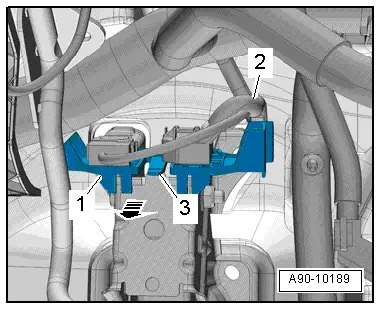
- Free up the wiring harness -2-.
- Release the tab -3- and remove the mount -1- from the pedal assembly -arrow-.
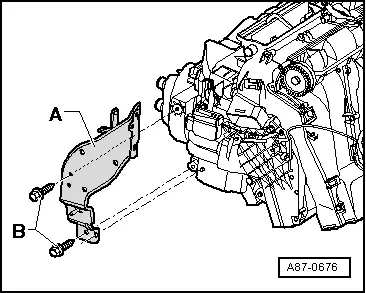
- Remove the bolts -B-.
- Free up the wiring harness on the bracket -A-, disengage the cable channel and move to the side.
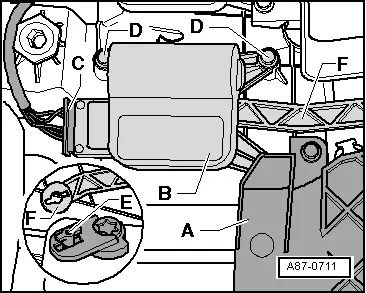
- Remove the bolts -D-.
- Push the heater core cover -A- slightly to the side at top and remove the actuator -B- from the temperature door shaft.
- Mark the connector and the actuator.
- Disconnect the connector -C-.
- Loosen the connecting rod -F- from the actuator operating lever -E-.
- Turn the actuator so far until the operating lever opening and the latch on the operating lever align.
- Remove the actuator from the operating lever.
Installing
Installation is done is reverse order, observe the following:
- Pry out the connecting element (here the operating lever -E-) from the actuator to be replaced (or select from the set of connecting elements) and install in the new actuator to be installed. Refer to → Chapter "Actuator Information".
- Install the actuator operating lever on the connecting rod -F-.
- The mount for the connecting rod -F- can only be installed in one position on the operating lever -E-.
- The mount for the connecting rod -F- must align with the operating lever -E- as shown in the illustration.
 Note
Note
If the mount for the connecting rod -F- and the operating lever -E- do not align, turn the mount in the actuator. Note the general information. Refer to → Chapter "Actuator Information".
- Connect the connector.
- Attach the actuator to the air distribution housing.
- There must not be any play in the connection between the actuator, shaft and connecting rod -F-.
- Carefully tighten the screws (tightening specification 1 Nm).
- Install the wiring harness so that it cannot come in contact with any moving parts (for example, the lever on the actuator).
- Install the data bus on board diagnostic interface. Refer to → Electrical Equipment; Rep. Gr.97; Control Modules; Data Bus On Board Diagnostic InterfaceJ533, Removing and Installing.
- Install the instrument panel. Refer to → Body Interior; Rep. Gr.70; Instrument Panel; Instrument Panel, Removing and Installing.
After completing the repair work, perform the following operations on the control head using the Vehicle Diagnostic Tester in the "Guided Fault Finding" function:
- Check the DTC memory and delete any currently displayed entries.
- Perform the basic setting.
- Perform output diagnostic test mode (DTM).
Right Temperature Door Motor -V159-, Removing and Installing
 Note
Note
- Only on vehicles with an automatic climate control system
- For vehicles with a manual climate control system (or heater without A/C system), the temperature doors are actuated by the Temperature Regulator Door Motor -V68-. The right and left temperature doors are connected to each other via the shaft.
- The color-coded connecting elements on the actuator for the identification has been discontinued as a running change as of 10/2013 for those connecting elements installed by the manufacturer and delivered as a replacement part. Additionally the connecting elements are no longer preinstalled on actuators that are delivered as a replacement part. Refer to → Chapter "Actuator Information" and the Parts Catalog.
- The actuators and the associated connecting elements differ. In some cases, however, the differences are so small that they are not always easy to detect at first glance. If a different version of the actuator or a connecting element is installed than the designated version, it usually leads to problems when the basic setting is to be performed. Refer to → Chapter "Actuator Information" and the Vehicle Diagnostic Tester in the "Guided Fault Finding" function.
 Caution
Problems with the Air Conditioning (A/C) system (heater) function after installing the incorrect version of components
- Different actuator versions can only be distinguished by their part number on the outside.
- The connecting elements are to some extent very similar and are not always easy to detect at first glance.
- If possible, only install an actuator if the new component to be installed is available with the related connecting element.
- Before installing, make sure that the actuator is the right one and the connecting element being installed is correctly allocated.
- If possible, only dispose of the removed components after having checked the function of the newly installed components.
Removing
- Note the general information. Refer to → Chapter "Actuator Information".
- Remove the glove compartment. Refer to → Body Interior; Rep. Gr.68; Storage Compartments and Covers; Glove Compartment, Removing and Installing.
- Remove the footwell vent on the front passenger side. Refer to → Chapter "Front Passenger Side Footwell Vent, Removing and Installing".
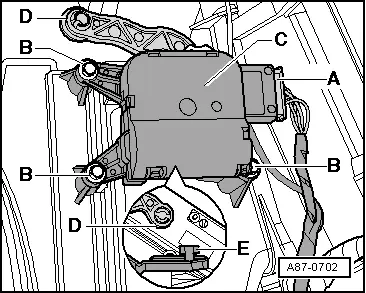
- Mark the connector and the actuator.
- Remove the bolts -B-.
- Remove the actuator -C- from the temperature door shaft.
- Disconnect the connector -A-.
- Loosen the connecting rod -D- from the actuator operating lever -E-.
- Turn the actuator so far until the operating lever opening and the latch on the operating lever align.
- Remove the actuator from the operating lever.
Installing
Installation is done is reverse order, observe the following:
- Pry out the connecting element (here the operating lever -E-) from the actuator to be replaced (or select from the set of connecting elements) and install in the new actuator to be installed. Refer to → Chapter "Actuator Information".
- Install the actuator operating lever on the connecting rod -D-.
- The mount for the connecting rod -D- can only be installed in one position on the operating lever -E-.
- The mount for the connecting rod -D- must align with the operating lever -E- as shown in the illustration.
 Note
Note
If the mount for the connecting rod -D- and the operating lever -E- do not align, turn the mount in the actuator. Note the general information. Refer to → Chapter "Actuator Information".
- Connect the connector.
- Attach the actuator to the air distribution housing.
- There must not be any play in the connection between the actuator, shaft and connecting rod -D-.
- Carefully tighten the screws (tightening specification 1 Nm).
- Install the wiring harness so that it cannot come in contact with any moving parts (for example, the lever on the actuator).
- Install the footwell vent on the front passenger side. Refer to → Chapter "Front Passenger Side Footwell Vent, Removing and Installing".
- Install the glove compartment. Refer to → Body Interior; Rep. Gr.68; Storage Compartments and Covers; Glove Compartment, Removing and Installing.
After completing the repair work, perform the following operations on the control head using the Vehicle Diagnostic Tester in the "Guided Fault Finding" function:
- Check the DTC memory and delete any currently displayed entries.
- Perform the basic setting.
- Perform output diagnostic test mode (DTM).
READ NEXT:
 Overview - Heater and A/C Unit Attachments and Air Intake Housing
Overview - Heater and A/C Unit Attachments and Air Intake Housing
1 - Sealing Plug
Equipment version
2 - Screw
1.5 Nm
3 - Screw
1.5 Nm
4
Evaporator, Removing and Installing
Removing
- Removing the air distribution housing. Refer to
→ Chapter "Air Distribution Housing, Removing and Installing".
- Remove the spacer foam -6-.
- Remove the bolts -1 SEE MORE:
Rear cross-traffic assist
Description
Applies to: vehicles with rear cross-traffic assist
Fig. 118 Sensor detection range for rear cross-traffic assist
Fig. 119 Center display: rear cross-traffic assist display
General information
The rear cross-traffic assist monitors the area behind
and next to the vehicle using radar se
Molded Foam Part, Removing and Installing, Audi Q3 through MY 2014
Removing
- Remove the front bumper cover. Refer to
→ Chapter "Bumper Cover, Removing and Installing".
- Guide the molded foam piece -2-
at the top out of the bracket -arrow-
and at the bottom out of the holder -1-.
Installing
Install in reverse order of removal. Note the f