
Audi Q3: Connector Assignment, Bluetooth Hands-Free Calling Concert MOST, 9ZX
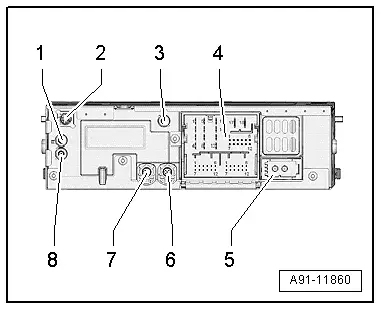
Information Electronics Control Module 1 -J794-
1 - Connector AM/FM1 from the Antenna Amplifier -R24- (Radio Antenna 2 -R93-)
2 - DAB connection from Antenna Amplifier 4 -R113-. Digital Radio Antenna -R183-
3 - Not Installed
4 - Black connection block with four multi-pin connectors
5 - MOST Bus
6 - 4-Pin Connector -T4ap- to the External Audio Source Connection -R199-/Internet Access Control Module -J666-
7 - 4-Pin Connector -T4d- to the Front Information Display Control Head -J685-
8 - Connection FM2 from Antenna Amplifier 3 -R112-, Antenna -R11-
Only North America and QV8
1 - Connector AM/FM1 from the Antenna Amplifier -R24- (Radio Antenna 2 -R93-)
2 - SAT connection from Roof Antenna -R216-, Satellite Antenna -R170-
3 - Not Installed
4 - Connection block with four multi-pin connectors
5 - MOST Bus
6 - 4-Pin Connector -T4ap- from the External Audio Source Connection -R199-/Internet Access Control Module - J666-
7 - 4-Pin Connector -T4d- to the Front Information Display Control Head -J685-
8 - Connection FM2 from Antenna Amplifier 3 -R112-, Antenna -R11-
 Note
Note
Unlisted connector terminals are not assigned.
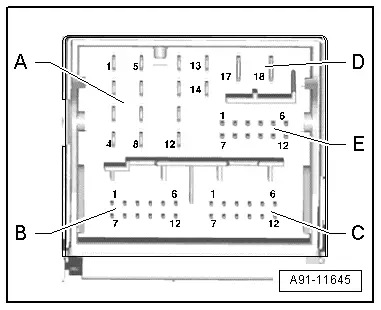
4 - Connection Block with Four Multi-Pin Connectors
A - 8-Pin Connector -T8ag-
1 - Right rear speaker (+)
2 - Right front speaker (+)
3 - Left front speaker (+)
4 - Left rear speaker (+)
5 - Right rear speaker (-)
6 - Right front speaker (-)
7 - Left front speaker (-)
8 - Left rear speaker (-)
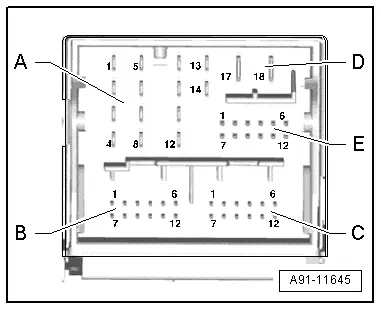
B - 12-Pin Connector -T12x-
4 - Microphone input (+) from Microphone Unit In Front Roof Module -R164-, Telephone Microphone -R38-
5 - CVBS cable (-) for the Rearview Camera System Control Module -J772-
6 - DIAG signal from Telephone Baseplate -R126-
11 - CVBS cable (+) for the Rearview Camera System Control Module -J772-
12 - Microphone input (-) from Microphone Unit In Front Roof Module -R164-, Telephone Microphone -R38-
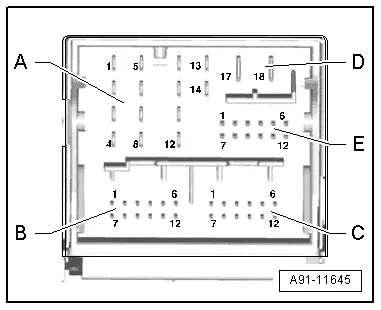
C - 12-Pin Connector -T12y-
All pins are connected to the External Audio Source Connection -R199-.
1 - LF-In Ground
2 - Right LF-In
3 - USB, +5 V. not on the Internet Access Control Module -J666-, UE2
4 - USB, Ground
5 - iPod, ACC Power
6 - Detect, not on the Internet Access Control Module -J666-, UE2
7 - Left LF-In
8 - LF-In ground shielding
9 - CVBS cable (+)
10 - CVBS cable (-)
11 - iPod data
12 - iPod data
Following pins are also still connected with the Internet Access Control Module -J666-, UE2.
3 - USB, +5 V
4 - USB, Ground
6 - Detect
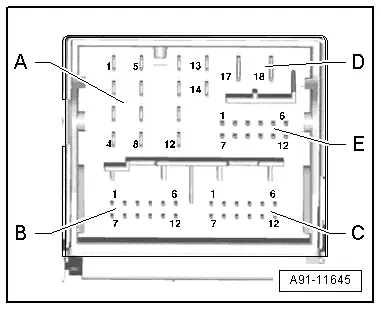
D - 8-Pin Connector -T8j-
9 - Subwoofer -R211-
10 - Center Speaker -R208-
13 - Subwoofer -R211-
14 - Center Speaker -R208-
17 - Terminal 31
18 - Terminal 30
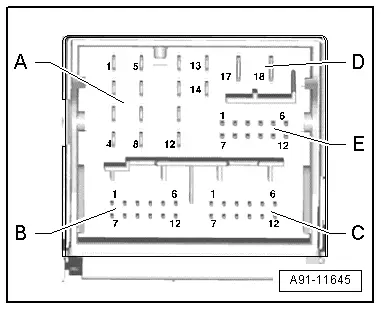
E - 12-Pin Connector -T12w-
7 - Ring-break Diagnostic Cable
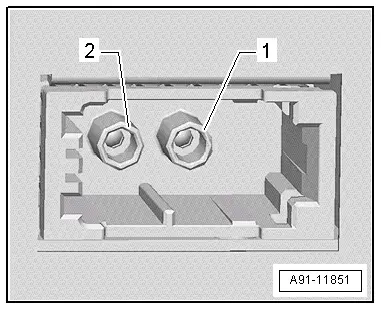
5 - MOST bus
1 - Input
2 - Output
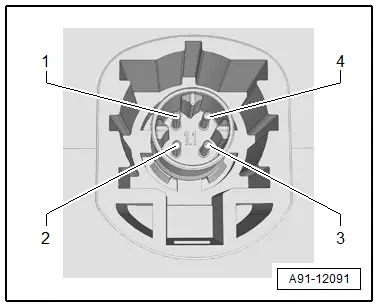
6 - 4-Pin Connector -T4ap-
All pins are connected with the External Audio Source Connection -R199-/Internet Access Control Module -J666-.
1 - D (+)
2 - iPod recognized
3 - D (-)
4 - Ground
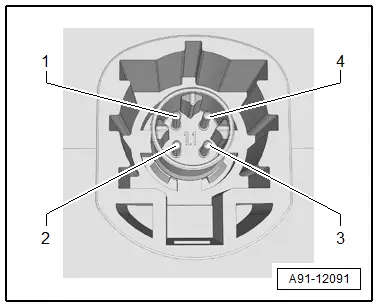
7 - 4-Pin Connector -T4d-
All pins are connected to the Front Information Display Control Head -J685-.
1 - LVDS (-)
2 - LIN
3 - LVDS (+)
4 - Ground
READ NEXT:
 MMI Bluetooth Hands-Free Calling Connector Assignments, 9ZX
Information Electronics Control Module 1 -J794-
1 - Not Assigned
2 - 4-Pin Connector -T4u- to the External Audio Source
Connection -R199-/Internet Access Control Module - J666-
Overview - Navigation System
Overview - Navigation System, General Information
The navigation system is available on vehicles with
Ready4Nav (7Q4), Navigation packet (7T2) and MMI navigation plus
(7T6).
The navigation sSEE MORE:
Safety belts
General information
Each seat is equipped with a three-point safety
belt. Safety belts that are worn correctly are the
most effective way to reduce the risk of serious or
fatal injuries in a collision. Therefore, wear your
safety belt correctly and make sure that all vehicle
passengers are also wear
Audi pre sense
Function overview
Applies to: vehicles with Audi pre sense
Within the limits of the system, the Audi pre
sense functions can initiate measures in certain
driving situations to protect the vehicle occupants
and other road users. Depending on the vehicle
equipment, various Audi pre sense systems
may b