
Audi Q3: Front Brake Caliper Balance Weight
Depending on the model for each brake caliper two vibration dampers are installed.
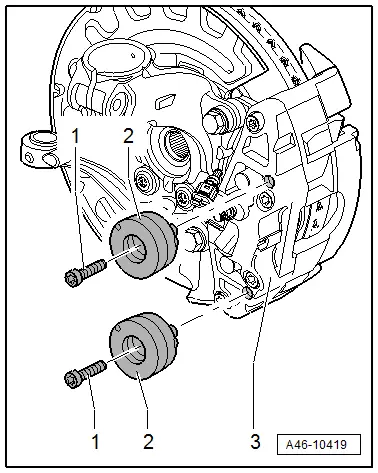
1 - Bolt
- 10 Nm
- Replace after each removal.
2 - Vibration Damper
- Installed 2 on each brake caliper
- Removing and installing, refer to → Chapter "Damper, Removing and Installing"
3 - Brake Caliper
Damper, Removing and Installing
Installed 2 on Each Brake Caliper
Removing
- Remove the existing dust cap.
- Remove the bolt -1-.
- Remove the vibration damper -2- from the brake caliper -3-.
Installing
Installed 2 on Each Brake Caliper
- Clean the brake caliper around the balance weight.
- Install the damper -2- in the brake caliper.
- Install the new bolt and tighten -item 1-.
- Replace the existing dust cap.
READ NEXT:
 Front Brake Pads, Removing and Installing
Brake Pads, Removing and Installing, 1LJ, 1ZD Brakes
If old brake pads are being replaced with new ones, then it is necessary
to check the brake rotor thickness for wear. Pay attention to the wear
Front Brake Caliper, Removing and Installing
Brake Caliper, Removing and Installing, 1LJ, 1ZD Brakes
Note
In the following description the brake caliper is removed
with the brake carrier and pads. The brake hose remains
connected.
Front Brake Caliper, Replacing
Brake Caliper, Replacing,1LJ, 1 ZD Brakes
Note
In the following description the brake caliper is removed
and replaced. The brake hose is removed.
Special tools and workshop equipment
rSEE MORE:
Cleaning/changing wiper blades
Fig. 46 Windshield wipers: changing the wiper blades
Wiper blade replacement position
Switch off the ignition and hold the windshield
wiper lever in position 4 fig.
44 until
the windshield wiper moves into the wiper
blade replacement position.
To bring the windshield wipers into the normal
Alternative routes
Applies to: vehicles with navigation system
Fig. 134 Alternative routes in the overview map
Opening alternative routes
Requirement: route guidance must be started
and the map must be displayed.
Press on in the side menu
on the map
fig. 131.
Current route
The distance to the destination a
© 2019-2026 Copyright www.auq3.net | 0.0105
