
Audi Q3: Antenna Amplifier, Removing and Installing
Antenna Amplifier -R24-, Removing and Installing
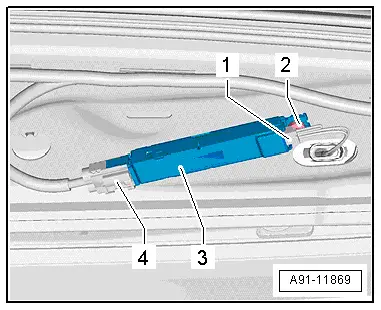
The Antenna Amplifier -R24- is located on the upper left of the rear lid.
Removing
- Turn off the ignition and all electrical equipment and remove the ignition key.
- Remove the upper rear lid trim panel. Refer to → Body Interior; Rep. Gr.70; Luggage Compartment Trim Panel; Rear Lid Upper Trim Panel, Removing and Installing.
- Release and disconnect the connectors -1 and 4- on the Antenna Amplifier -R24--3-.
- Remove the bolt -2- and remove the Antenna Amplifier -R24--3- from the rear lid.
Installing
- Install in reverse order of removal.
Antenna Amplifier 2 -R111-, Removing and Installing
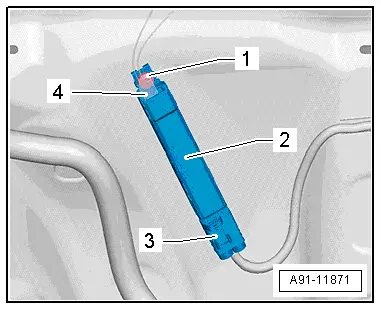
The Antenna Amplifier 2 -R111- is located on the bottom right of the rear lid.
Removing
- Turn off the ignition and all electrical equipment and remove the ignition key.
- Remove the lower rear lid trim panel. Refer to → Body Interior; Rep. Gr.70; Luggage Compartment Trim Panel; Rear Lid Lower Trim Panel, Removing and Installing.
- Release and disconnect the connectors -3 and 4- on the Antenna Amplifier 2 -R111--2-.
- Remove the bolt -1- and remove the Antenna Amplifier 2 -R111--2- from the rear lid.
Installing
- Install in reverse order of removal.
Antenna Amplifier 3 -R112-, Removing and Installing
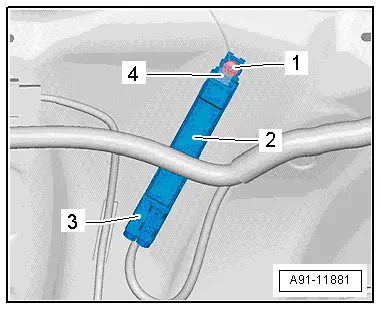
The Antenna Amplifier 3 -R112- is located on the bottom left of the rear lid.
Removing
- Turn off the ignition and all electrical equipment and remove the ignition key.
- Remove the lower rear lid trim panel. Refer to → Body Interior; Rep. Gr.70; Luggage Compartment Trim Panel; Rear Lid Lower Trim Panel, Removing and Installing.
- Release and disconnect the connectors -3 and 4- on the Antenna Amplifier 3 -R112--2-.
- Remove the bolt -1- and remove the Antenna Amplifier 3 -R112--2- from the rear lid.
Installing
- Install in reverse order of removal.
Antenna Amplifier 4 -R113-, Removing and Installing
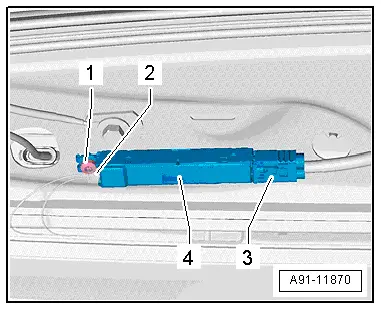
Antenna Amplifier 4 -R113- is located at the top right of the rear lid.
Removing
- Turn off the ignition and all electrical equipment and remove the ignition key.
- Remove the upper rear lid trim panel. Refer to → Body Interior; Rep. Gr.70; Luggage Compartment Trim Panel; Rear Lid Upper Trim Panel, Removing and Installing.
- Release and disconnect the connectors -2 and 3- from the Antenna Amplifier 4 -R113--4-.
- Remove the bolt -1- and remove the Antenna Amplifier 4 -R113--4- from the rear lid.
Installing
- Install in reverse order of removal.
READ NEXT:
 Roof Antenna, Removing and Installing
The Roof Antenna -R216- has up to three connectors.
The antenna wires are connected directly to the base of the
Roof Antenna -R216-.
The headliner must be lowered in order to remove the Roof
Ant
Antenna Amplifier Connector Assignments
Antenna Amplifier 4 -R113-
1 - Window antenna connection, Digital Radio Antenna -R183-
2 - DAB connection to the Radio -R-
3 - Not Assigned
Window Antenna ConnectorSEE MORE:
Midrange Speaker Trim, Removing and Installing
Special tools and workshop equipment
required
Wedge Set -T10383-
Removing
- Pry out the speaker trim -1-
along the door trim seam -arrow-
using the Wedge -T10383/1- and remove it.
Installing
Install in reverse order of removal.
Installation notes, for example tightening specifi
Lower Control Arm, Removing and Installing
Special tools and workshop equipment
required
Locating Pins -T10096-
Torque Wrench 1332 40-200Nm -VAG1332-
Removing
- Before starting work, determine the measurement
-a-, for example with tape measure,
from center of wheel to lower edge of wheelhouse.
Note
Measurement 