
Audi Q3: Overview - Door Handle and Door Lock
Overview - Exterior Door Handle, Bracket
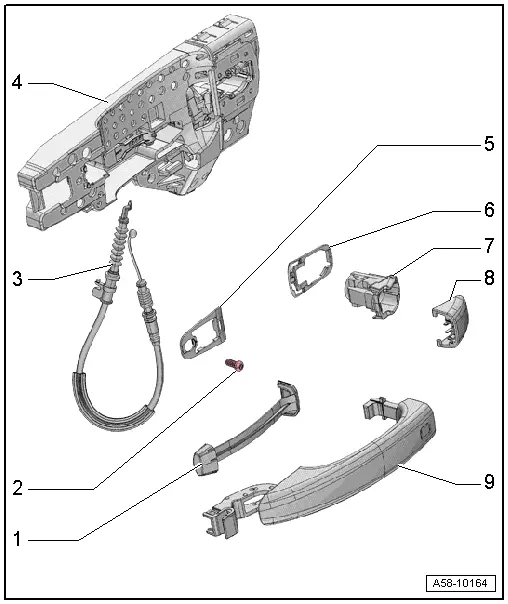
1 - Exterior Door Handle Trim
- Removing and installing. Refer to → Chapter "Door Handle Trim, Removing and Installing".
2 - Bolt
- 2.5 Nm
3 - Operating Cable
- For the door lock
 Caution
There is a risk of malfunctions.
The door lock must be removed and installed together with the bracket to prevent over-bending the cable when disengaging and engaging it.
The cable must be disconnected from/attached to lever on the door lock outside of the door.
- Removing and installing. Refer to → Chapter "Door Lock Cable, Removing and Installing".
4 - Bracket
- Removing and installing. Refer to → Chapter "Bracket, Removing and Installing".
5 - Front Backing
- Removing and installing. Refer to → Chapter "Door Handle, Removing and Installing".
6 - Rear Backing
- Removing and installing. Refer to → Chapter "Door Handle, Removing and Installing".
7 - Housing
- Removing and installing. Refer to → Chapter "Housing, Removing and Installing".
8 - Cap
- Removing and installing. Refer to → Chapter "Housing Cap, Removing and Installing".
9 - Exterior Door Handle
- Removing and installing. Refer to → Chapter "Door Handle, Removing and Installing".
Overview Door Lock, Striker Pin
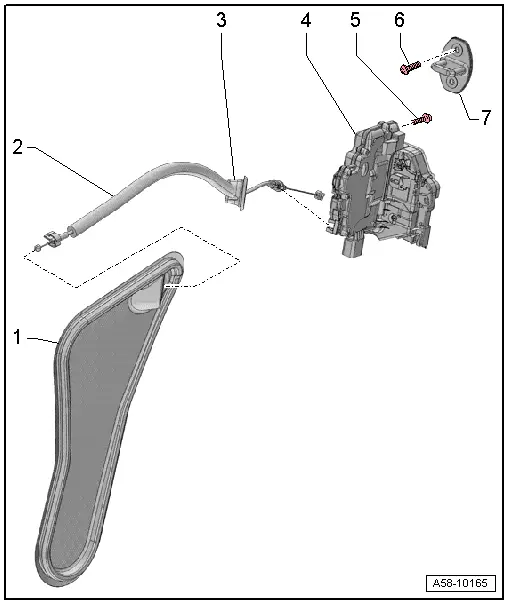
1 - Door Inner Cover
- Removing and installing. Refer to → Chapter "Door Inner Cover, Removing and Installing".
2 - Door Lock Operating Cable
- Removing and installing. Refer to → Chapter "Door Opener Cable, Removing and Installing".
3 - Grommet
- Cannot be replaced separately
4 - Door Lock
- Removing and installing. Refer to → Chapter "Door Lock, Removing and Installing".
5 - Bolt
- 19 Nm
- Quantity: 2
6 - Bolt
- 25 Nm
- Quantity: 2
7 - Catch
- Removing and installing. Refer to → Chapter "Catch, Removing and Installing".
READ NEXT:
 Window Regulator Motor, Removing and Installing
Removing
Note
The window regulator motor can be removed or installed with
the motor or door window in any position.
- Remove the rear door trim panel. Refer to
→ Body Interi
Inner Window Shaft Strip, Removing and Installing
Removing
- Remove the rear window frame trim panel. Refer to
→ Body Interior; Rep. Gr.70; Rear Door Trim Panels; Window Frame
Trim Panel, Removing and Installing.
- Rem
Door Handle, Removing and Installing
Housing, Removing and Installing
Removing
- Remove the sealing plugs.
- Remove the clamping screw -3-
until it stops using a screwdriver -4-.
- Press the housing retaining brackSEE MORE:
Driver Side Airbag
Overview - Driver Side Airbag
1 - Locking Bracket
Use a T25 TORX screwdriver, approximately 100 mm long
2 - Steering Column Electronics Control Module -J527-
With Airbag Spiral Spring/Return Spring with Slip Ring -F138- and
Steering Angle Sensor -G85-
Removing a
Air Quality Sensor -G238-, Removing and Installing
Removing
- Remove the plenum chamber cover. Refer to
→ Body Exterior; Rep. Gr.50; Bulkhead; Plenum Chamber Cover,
Removing and Installing.
- Release the securing tab -4-
and turn the housing -1- for the
Air Quality Sensor -G238- counter-clockwise
-arrow-.
-
© 2019-2026 Copyright www.auq3.net | 0.0092
