
Audi Q3: Light Switch -E1-, Removing and Installing
Removing
- Turn the light switch to position "0".
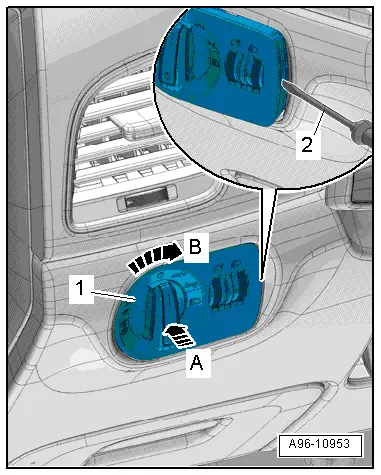
- Push the light switch in direction of -arrow A- and turn right at the same time in direction of -arrow B-.
- Hold the switch in this position ad at the same time remove the light switch from the switch housing -1-, to do this open the tab on the opening -2- with a narrow screwdriver.
- Disconnect the connectors.
Installing
Install in reverse order of removal. Note the following:
- Push the switch into the switch housing until it clicks into place.
Instrument Panel and Switch Illumination Dimmer Switch -E20-, Removing and Installing
Depending on vehicle equipment, the Instrument Panel Illumination Dimmer Switch -E20-, and the Headlamp Adjuster -E102- are in the same housing. They cannot be replaced separately if faulty; allocation. Refer to the Parts Catalog.
Removing
- Remove the light switch. Refer to → Chapter "Light Switch -E1-, Removing and Installing".
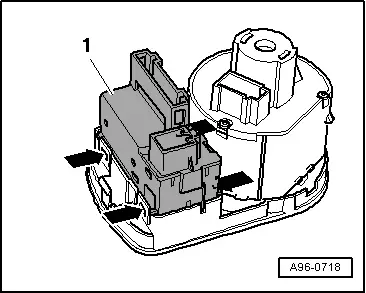
- Open the clip -arrows- and remove the housing -1-.
Installing
Install in reverse order of removal. Note the following:
- Install the light switch. Refer to → Chapter "Light Switch -E1-, Removing and Installing".
ASR/ESP Button -E256-, Removing and Installing
Removing
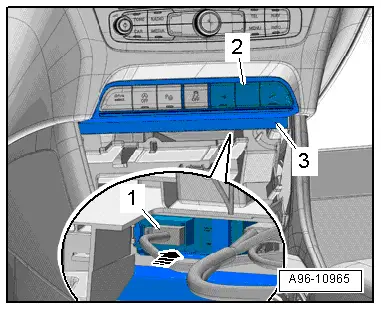
- Remove the A/C system control head. Refer to → Heating Ventilation and Air Conditioning; Rep. Gr.87; Display And Control Unit, Removing and Installing.
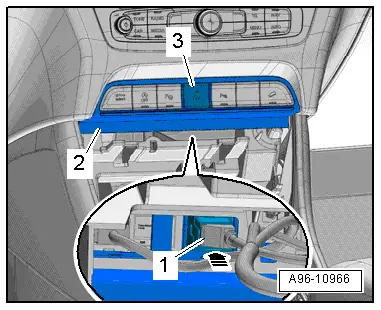
- Push out the button -3- through the opening behind the mount -2- in direction of -arrow-.
- Disconnect the connector -1-.
Installing
Install in reverse order of removal. Note the following:
- Install the A/C system control head. Refer to → Heating Ventilation and Air Conditioning; Rep. Gr.87; Display And Control Unit, Removing and Installing.
Instrument Panel Button, Removing and Installing
Lower Left Instrument Panel Button Unit, Removing and Installing
Removing
- Remove the A/C system control head. Refer to → Heating Ventilation and Air Conditioning; Rep. Gr.87; Display And Control Unit, Removing and Installing.
- Push out the button unit -3- through the opening behind the mount -2- in direction of -arrow-.
- Disconnect the connector -1-.
Installing
Install in reverse order of removal. Note the following:
- Install the A/C system control head. Refer to → Heating Ventilation and Air Conditioning; Rep. Gr.87; Display And Control Unit, Removing and Installing.
Lower Right Instrument Panel Button Unit, Removing and Installing
Removing
- Remove the A/C system control head. Refer to → Heating Ventilation and Air Conditioning; Rep. Gr.87; Display And Control Unit, Removing and Installing.
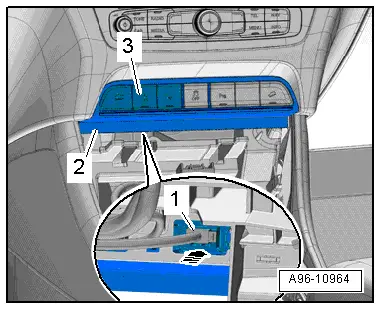
- Push out the button unit -2- through the opening behind the mount -3- in direction of -arrow-.
- Disconnect the connector -1-.
Installing
Install in reverse order of removal. Note the following:
- Install the A/C system control head. Refer to → Heating Ventilation and Air Conditioning; Rep. Gr.87; Display And Control Unit, Removing and Installing.
Emergency Flasher Button -E229-, Removing and Installing
Removing
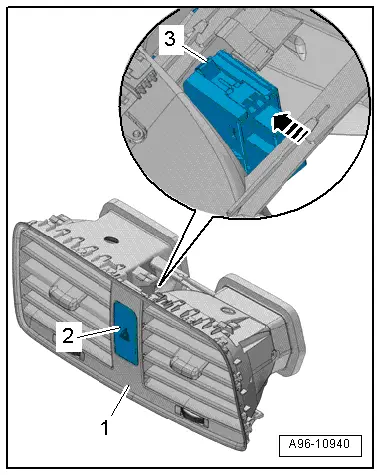
- Remove the center instrument vent. Refer to → Body Interior; Rep. Gr.70; Instrument Panel; Instrument Panel Vent, Removing and Installing.
- Open the upper and lower clip -3-.
- Remove the emergency flasher button -2- from the instrument panel vent -1- in direction of -arrow-.
Installing
Install in reverse order of removal. Note the following:
- Install the center instrument vent. Refer to → Body Interior; Rep. Gr.70; Instrument Panel; Instrument Panel Vent, Removing and Installing.
Glove Compartment Lamp Switch -E26-, Removing and Installing
Removing
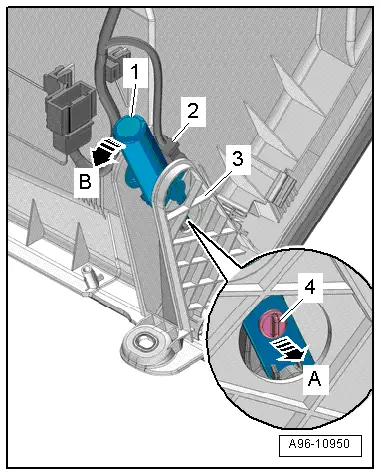
- Remove the glove compartment. Refer to → Body Exterior; Rep. Gr.68; Storage Compartment/Covers; Glove Compartment, Removing and Installing.
- Disconnect the connector -2-.
- Remove the hinge bolts -4- in direction of -arrow A-.
- Release the switch -1- counter-clockwise in direction of -arrow B-.
- Remove the switch, to do this push the outer mount -3- slightly to the side.
Installing
Install in reverse order of removal. Note the following:
- Install the glove compartment. Refer to → Body Exterior; Rep. Gr.68; Storage Compartment/Covers; Glove Compartment, Removing and Installing.
Mirror Adjusting Switch -E43-/Folding Mirror Adjustment Switch -E168-, Removing and Installing
Removing
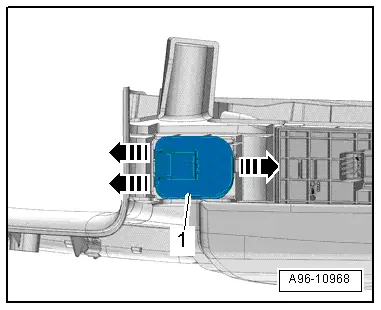
- Remove the pull handle with the switch mount. Refer to → Body Interior; Rep. Gr.70; Door Trim Panels; Front Pull Handle, Removing and Installing.
- Release the hooks in direction of -arrows- carefully with a small screwdriver.
- Press the mirror adjusting switch -1- out of the switch mount.
Installing
Install in reverse order of removal. Note the following:
 Note
Note
When installing, ensure symbol panel is inserted in front of mirror adjusting switch.
- Install the armrest. Refer to → Body Interior; Rep. Gr.70; Front Door Trim Panels; Front Pull Handle Removing and Installing.
READ NEXT:
 Power Window Control Head In Driver Door -E512-, Removing and Installing
Removing
- Remove the pull handle with the switch mount. Refer to
→ Body Interior; Rep. Gr.70; Door Trim Panels; Front Pull
Handle, Removing and Installing.
- Carefully
Rear Lid Lock Cylinder Unlock Button -F248-, Removing and Installing
Removing
- Remove the rear lid trim panel. Refer to
→ Body Interior; Rep. Gr.70; Luggage Compartment Trim Panels;
Rear Lid Lower Trim Panel, Removing and Installing.
-
Anti-Theft Alarm System
Overview - Interior Monitoring
1 - Nut
7 Nm
2 - Bracket
For Alarm Horn -H12-
3 - Alarm Horn -H12-
Removing and installing. Refer to
→ CSEE MORE:
Audi connect vehicle control services
Services
Applies to: vehicles with Audi connect vehicle control
Using Audi connect vehicle control services, you
can perform tasks such as viewing data about
your vehicle or control vehicle functions remotely.
You can view and use services available for your
vehicle at my.audi.com or through the my
10 mm2- or 16 mm2
Wires with Separate Butt Connectors, Repairing
Special tools and workshop equipment
required
Wiring Harness Repair Set - Hot Air Blower -VAS1978/14A-
from the Wiring Harness Repair Set -VAS1978B-
Wiring Harness Repair - Blower - Shrink Element
-VAS1978/15A- from the Wiring Harness Repair Set -VAS1978B-
Wiring Harness Repair Set VAS