
Audi Q3: DVD/CD Changer
CD Changer, Removing and Installing
The CD Changer -R41- is behind the left luggage compartment trim panel.
 Note
Note
If replacing the control module, select the "Replace control module" function for the corresponding control module on the Vehicle Diagnostic Tester.
Special tools and workshop equipment required
- Radio Removal Tool -T10057-
- Fiber Optic Repair Set -VAS6223B-
- Fiber-Optic Repair Set - Connector Protective Caps -VAS6223/9-.
Removing
- Turn off the ignition and all electrical equipment and remove the ignition key.
- Remove the cover from the left side of the luggage compartment.
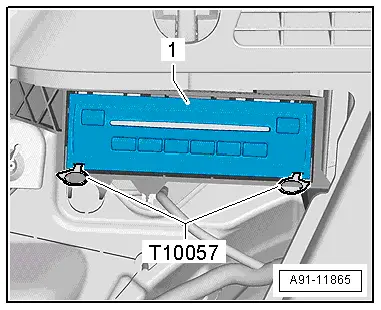
- Insert the two clips on the Radio Removal Tool -T10057- in the release slits on the CD Changer -R41--1- until they engage. Points on the grip eyelets of tool face outward.
- Remove the CD Changer -R41--1- from the frame.
- Disconnect all of the connectors from the CD Changer -R41-.
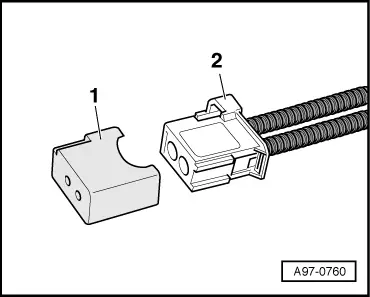
- Insert the Fiber-Optic Repair Set - Connector Protective Caps -VAS6223/9--1- onto the MOST bus connector -2-.
- Press the locking latches on the CD Changer -R41- to remove the Radio Removal Tool -T10057-.
Installing
- Install in reverse order of removal. Note the following:
- Connect all the connectors.
- Push the CD Changer -R41- into the mounting frame until it engages.
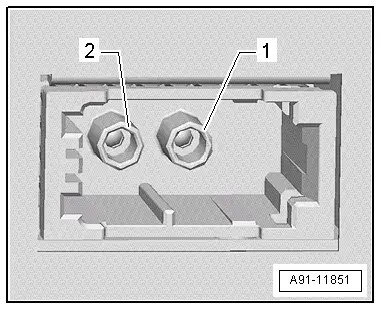
Connector Assignments
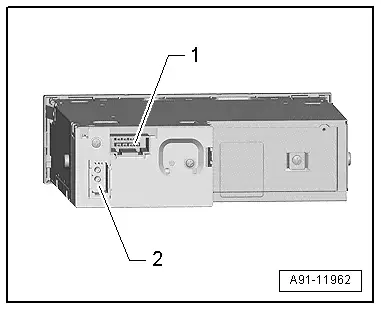
CD Changer -R41-
1 - 8-Pin Connector -T8aa-
2 - MOST Bus
 Note
Note
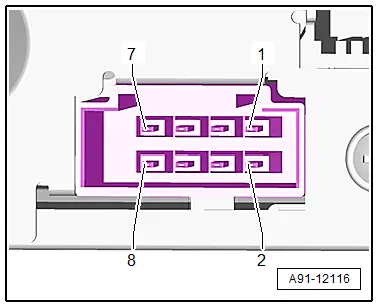
Unlisted connector terminals are not assigned.
1 -8-Pin Connector -T8aa-
1 - Terminal 31
2 - Terminal 30
5 - Ring-break Diagnostic Cable
2 - MOST bus
1 - Output
2 - Input
READ NEXT:
 Overview - Telephone
Overview - Telephone, Cell Phone Pre-Installation, 9ZF
Cell Phone Preparation in Information Electronics Control
Module 1 -J794-, Concert MOST, 9ZF
The Telephone Baseplate -R126- is installed in t
Overview - Microphone Unit
The Microphone Unit In Front Roof Module -R164- is installed
in the Front Interior Lamp -W1-. Up to three microphones may be
installed, depending on the equipment.
One microphone (Interior MicropSEE MORE:
Brake Lines
Separating Points
Brake Line on the Underbody
1 - Brake line
2 - Brake hose
3 - Spring
4 - Brake hose bracket
Tightening Specifications
Refer to item -10-, item -16-.
Brake Line to Brake Line
- Counterhold the union nut -1-
when tighteni
Electronic Damping
Overview - Electronic Damping Component Location
Note
The body acceleration sensors may not be interchanged with
each other.
1 - Right Front Body Acceleration Sensor -G342-
Removing and installing. Refer to
→ Chapter "Left/Right Front Body Acceleration Sensor -