
Audi Q3: Driver Side Footwell Vent, Removing and Installing
Removing
- Remove the driver side instrument panel cover. Refer to → Body Interior; Rep. Gr.68; Storage Compartments and Covers; Driver Side Instrument Panel Cover, Removing and Installing.
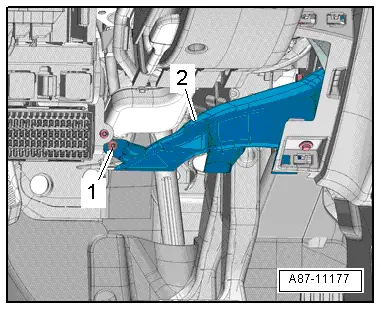
- Remove the bolt -1-.
- Remove the footwell vent -2-.
Installing
Installation is done is reverse order, observe the following:
- Install the driver side instrument panel cover. Refer to → Body Interior; Rep. Gr.68; Storage Compartments and Covers; Driver Side Instrument Panel Cover, Removing and Installing.
Front Passenger Side Footwell Vent, Removing and Installing
Removing
- Remove the glove compartment. Refer to → Body Interior; Rep. Gr.68; Storage Compartments and Covers; Glove Compartment, Removing and Installing.
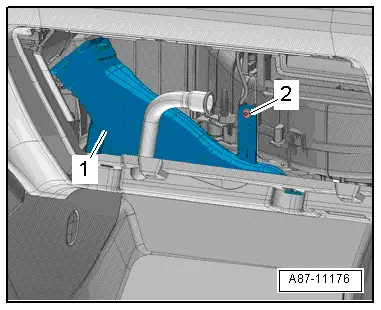
- Remove the bolt -2-.
- Remove the footwell vent -1-.
Installing
Installation is done is reverse order, observe the following:
- Install the glove compartment. Refer to → Body Interior; Rep. Gr.68; Storage Compartments and Covers; Glove Compartment, Removing and Installing.
Rear Footwell Vent, Removing and Installing
Removing
- Remove the affected seat (driver- or front passenger seat). Refer to → Body Interior; Rep. Gr.72; Front Seats; Front Seat, Removing and Installing.
- Lift the carpet far enough so that the footwell vent can be removed. Refer to → Body Interior; Rep. Gr.70; Passenger Compartment Trim; Carpet, Removing and Installing.
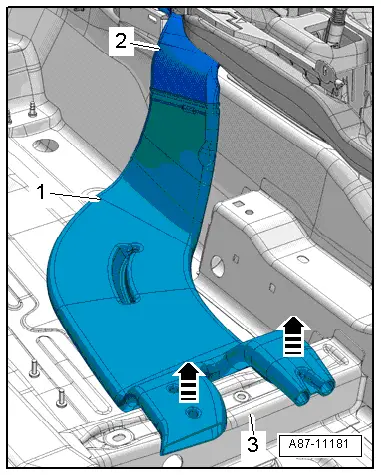
- Loosen the rear footwell vent -1- from the retainers on the body -3--arrows-.
- Pull the rear footwell vent out of the air guide channel -2- and remove it.
Installing
Installation is done is reverse order, observe the following:
- Install the carpet. Refer to → Body Interior; Rep. Gr.70; Passenger Compartment Trim; Carpet, Removing and Installing.
- Install the removed affected seat (driver- or front passenger seat). Refer to → Body Interior; Rep. Gr.72; Front Seats; Front Seat, Removing and Installing.
READ NEXT:
 Air Distribution Channels, Removing and Installing
Center Instrument Panel Vent Air Guide, Removing and Installing
Removing
- Remove the instrument panel. Refer to
→ Body Interior; Rep. Gr.70; Instrument Panel; Instrument Pan
Passenger Compartment Forced Air Extraction, Checking
Ventilation Slots in Luggage Compartment, Checking
Test Sequence
- Check the left and right air guides through the vent
openings -arrow- built into the
luggage compartment side trim panel -SEE MORE:
Summary
Cockpit
Fig. 1 Cockpit
Door handle
Central locking switch
Air vent with thumbwheel
Lever for:
Turn signals and high beams
High beam assistant
Lane departure warning
Lane guidance
Multifunction steering wheel with:
Horn
Driver's airbag
Operating buttons
Shift paddles
Front Exterior Door Handle Switch, Removing and Installing
Removing
- Remove the exterior door handle. Refer to
→ Body Exterior; Rep. Gr.57; Door Components; Door Handle,
Removing and Installing.
Note
Ignore -1 and 2-.
- Release the retaining tabs in direction of
-A arrows- and remove the connector
-3-.
- C