
Audi Q3: Center Console Rear Trim, Removing and Installing
Special tools and workshop equipment required
- Wedge Set -T10383-
Removing
- Move the front seats all the way forward.
Vehicles with a Center Armrest:
- Vehicles with vents: remove the rear vent. Refer to → Chapter "Rear Vents, Removing and Installing".
- Equipment level with storage compartment: remove the rear storage compartment. Refer to → Chapter "Center Console Rear Storage Compartment, Removing and Installing".
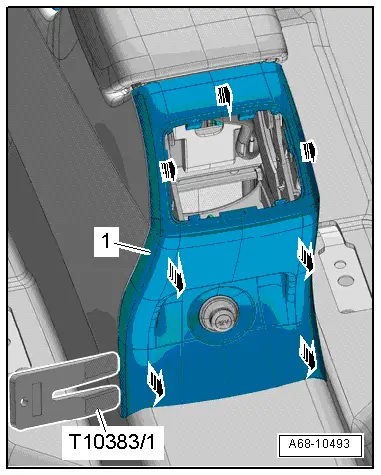
- Unclip the cover -1- at the sides and above using the wedge -T10383/1--arrows-.
- Remove the cover toward the rear from the center console.
- Disconnect the connectors.
Vehicles without a Center Armrest:
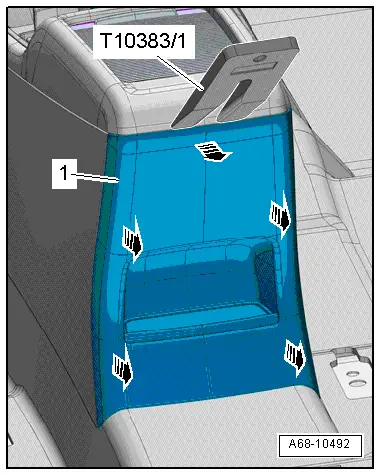
- Unclip the cover -1- above and at the sides carefully with the Wedge -T10383/1--arrows-.
- Remove the cover toward the rear from the center console.
- Disconnect the connector if equipped.
Installing
Install in reverse order of removal.
Installation notes, for example tightening specifications, replacing components. Refer to → Chapter "Overview - Center Console".
Center Console Insert, Removing and Installing
Special tools and workshop equipment required
- Trim Removal Wedge -3409-
Removing
- Versions with a selector lever: move the selector lever into "D/S".
- Turn off the ignition.
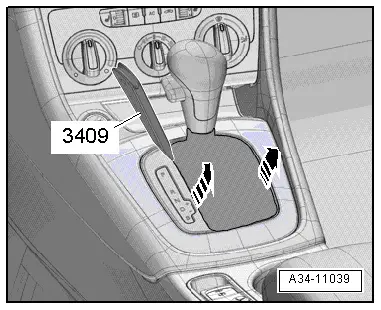
- Carefully pry out the selector lever/shift lever boot at the side using a Trim Removal Wedge -3409- or small screwdriver -arrows- and fold it upward.
- To prevent damage to the surface, tape of the center console trim around the center console with adhesive tape.
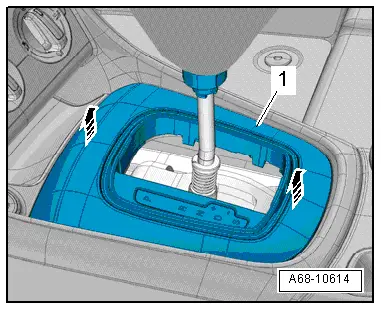
- Reach with the hand under the center console insert -1- and carefully remove it upward from the center console -arrows-.
- Disconnect the connectors and carefully remove the center console insert over the selector lever/gearshift lever.
Installing
Install in reverse order of removal.
Installation notes, for example tightening specifications, replacing components. Refer to → Chapter "Overview - Center Console".
READ NEXT:
 Front Center Console Storage Compartment, Removing and Installing
Front Storage Compartment, Removing and Installing
Removing
- Remove the center console insert. Refer to
→ Chapter "Center Console Insert, Removing and Installing".
- Release the
Center Console, Removing and Installing
Center Console, Removing and Installing
Removing
- Remove the center console insert. Refer to
→ Chapter "Center Console Insert, Removing and Installing".
- Versions with Access/St
Front Center Armrest
Overview - Front Center Armrest
1 - Front Center Armrest
Removing and installing. Refer to
→ Chapter "Front Center Armrest, Removing and Installing".
2 - Lower CSEE MORE:
Keys
Key set
Fig. 24 Your vehicle key set
Fig. 25 Vehicle key: PANIC button
The key set includes two vehicle keys when delivered
from the factory.
Vehicle key
You can unlock and lock your vehicle with the vehicle
key. To fold the key out, press the release
button
fig. 24.
If necessary, you can use
Ball Joint, Removing and Installing
Special tools and workshop equipment
required
Puller - Ball Joint -3287A-
Digital Torque Wrench -VAG1756A-
Torque Wrench 1332 Insert - Ring Wrench - 18mm -VAG1332/10-
Removing
- Loosen drive axle bolt on the wheel hub. Refer to
→ Chapter "Drive Axle Threaded Connection, Lo