
Audi Q3: Overview - Rearview Camera System
The rear view camera system assists the driver when driving in reverse by providing the driver with an image of the traffic situation behind the vehicle via the Front Information Display Control Head -J685-.
The rear view camera system is switched on when engaging the reverse gear. The system can be activated manually by pressing the Parking Aid Button -E266- in the center console (optional).
The rear view camera system consists of the following components:
- Rearview Camera -R189-
- Rearview Camera System Control Module -J772-
- Information Electronics Control Module 1 -J794-
- Steering wheel with Steering Angle Sensor -G85-
Other control modules may be installed as optional equipment.
It is not permitted to install an auxiliary license plate for vehicles with rear view camera system as it could impair the function of the rear view camera system.
Perform the Fault Finding with the Vehicle Diagnostic Tester.
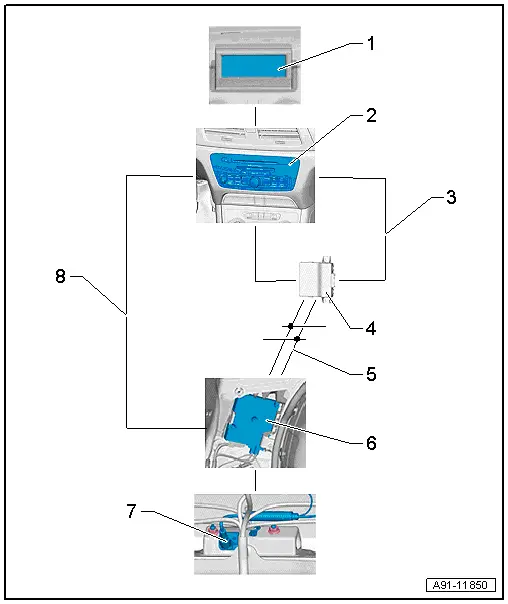
1 - Front Information Display Control Head -J685-
- In center of the instrument panel
2 - Information Electronics Control Module 1 -J794-
- Inside the instrument panel
3 - MOST Bus
4 - Data Bus On Board Diagnostic Interface -J533-
- Behind the driver side left compartment
5 - CAN bus, Convenience
6 - Rearview Camera System Control Module -J772-
- Behind the luggage compartment trim panel on the left side
7 - Rearview Camera -R189-
- In the rear lid
8 - FBAS wire to the Information Electronics Control Module 1 -J794-
Overview - Rearview Camera System
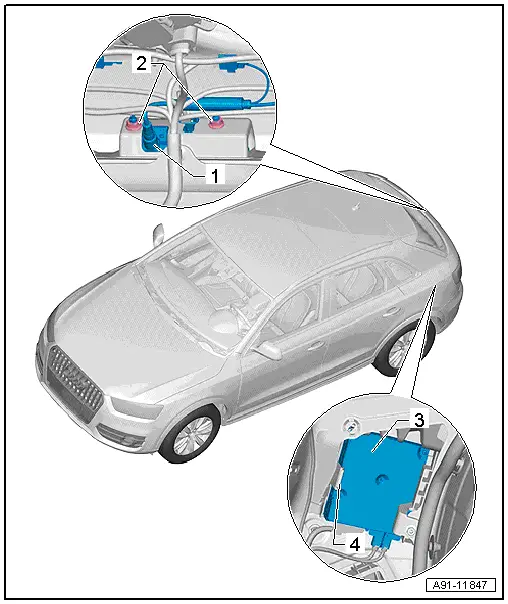
1 - Rearview Camera -R189- in handle button
- Removing and installing. Refer to → Chapter "Rearview Camera -R189-, Removing and Installing".
- Calibrating. Refer to → Chapter "Rearview Camera System, Calibrating".
2 - Nut
- 6 Nm
- Quantity: 2
3 - Rearview Camera System Control Module -J772-
- Connector assignment. Refer to → Chapter "Connector Assignments".
- Removing and installing. Refer to → Chapter "Rearview Camera System Control Module -J772-, Removing and Installing".
- Calibrating. Refer to → Chapter "Rearview Camera System, Calibrating".
4 - Retainer
READ NEXT:
 Rearview Camera -R189-, Removing and Installing
The Rearview Camera -R189- is inside the rear lid handle
button. It permanently attached to the button.
If the Rearview Camera -R189- must be replaced, then the
handle button must also be replace
Multifunction Steering Wheel
Overview - Multifunction Steering Wheel
Buttons are integrated in the steering wheel for easier
operation of Infotainment, telephone and the navigation system.
On vehicles with Tiptronic, rock
Connection for External Multimedia Devices
Overview - External Multimedia Devices
There are several External Audio Source Connection -R199-
versions:
AMI (Audi Music Interface), MOST, UF7
The interface -1- is located in
the center consoSEE MORE:
Adding engine oil
Fig. 149 Engine compartment: engine oil filling opening
cover (example)
Observe the safety precautions.
Turn the engine off.
Open the hood.
Unscrew the cap for the
engine oil filler
opening fig. 149.
Carefully add 0.5 quart (0.5 liter) of the correct
oil.
Check the oil level again after
Side Airbags
Overview - Front Side Airbag
1 - Backrest Frame
2 - Hook
For securing the side airbag to the backrest frame
3 - Front Side Airbag
Driver side: with the Driver Thorax Airbag Igniter -N199-
Front passenger side: with Front Passenger Thorax Airbag Igniter 